Workflows
Export AI slides to PowerPoint without kidding yourself
Gamma lets you draft outline-first, present from a link when you can, and export AI slides to PowerPoint when the process demands a file. This page is the honest map: what travels cleanly, when a link is better, and how to plan fidelity before you design fragile overlays.
Who export to PPTX is for
Use this workflow when stakeholders still require a .pptx attachment— procurement, offline venues, enablement teams who edit locally, board archives, or customers who forward files internally. You want AI for structure and speed, then a clean handoff into PowerPoint-centric processes without rebuilding the argument from a blank file.
- Sellers sending leave-behinds champions will markup offline.
- Enablement building modules others will edit in PowerPoint.
- Operators delivering board or exec packets into email archives.
- Agencies whose clients demand editable PPTX deliverables.
Not for you if…
If everyone can open a present link and you control the room, you may not need PPTX—do not pay complexity tax for a file fetish. If legal requires authoring inside a locked master from the first keystroke, start there. If your deck is mostly embedded Excel objects and macros, native PowerPoint remains the assembly environment.
What deck are you actually making?
Three questions. One recommended path, no generic “it depends” fog.
The HANDS checklist before export
HANDS is the preflight: Handoff owner after export, Assumptions on canvas, No fragile overlays, Density matched to leave-behind readers, Sample export early. Skipping Sample is how teams discover broken tables the night before a deadline. Write HANDS into the project brief when you know the room requires a file.
- Handoff, who owns the file after it leaves Gamma, and how numbers sync.
- Assumptions, put math and caveats on slides, not only in speaker notes.
- No fragile overlays, simplify stacks that export poorly.
- Density, write for readers who skip around without narration.
- Sample, export five representative slides before building thirty.
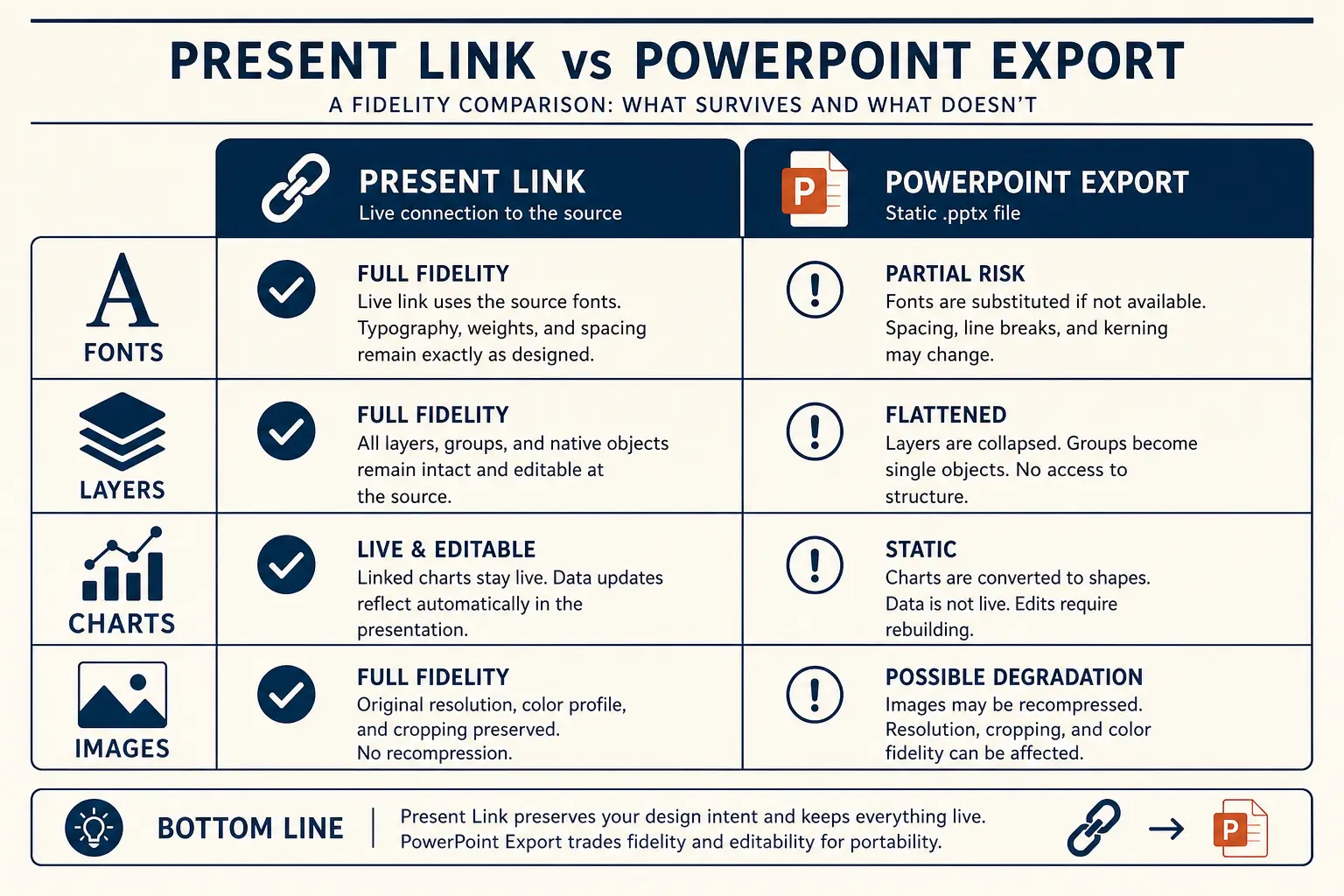
Present link vs PPTX fidelity
Present link
- • Live latest edits
- • Best for your room
- • Analytics-friendly
Export PPTX / PDF
- • Offline / procurement
- • Brand review in PPT
- • Expect cleanup passes
How the Gamma export path works
- Brief with channel equals PPTX or leave-behind file.
- Outline and edit for claim titles and simple layouts.
- Sample export; adjust habits.
- Full export on Pro; name versions; appoint handoff owner.
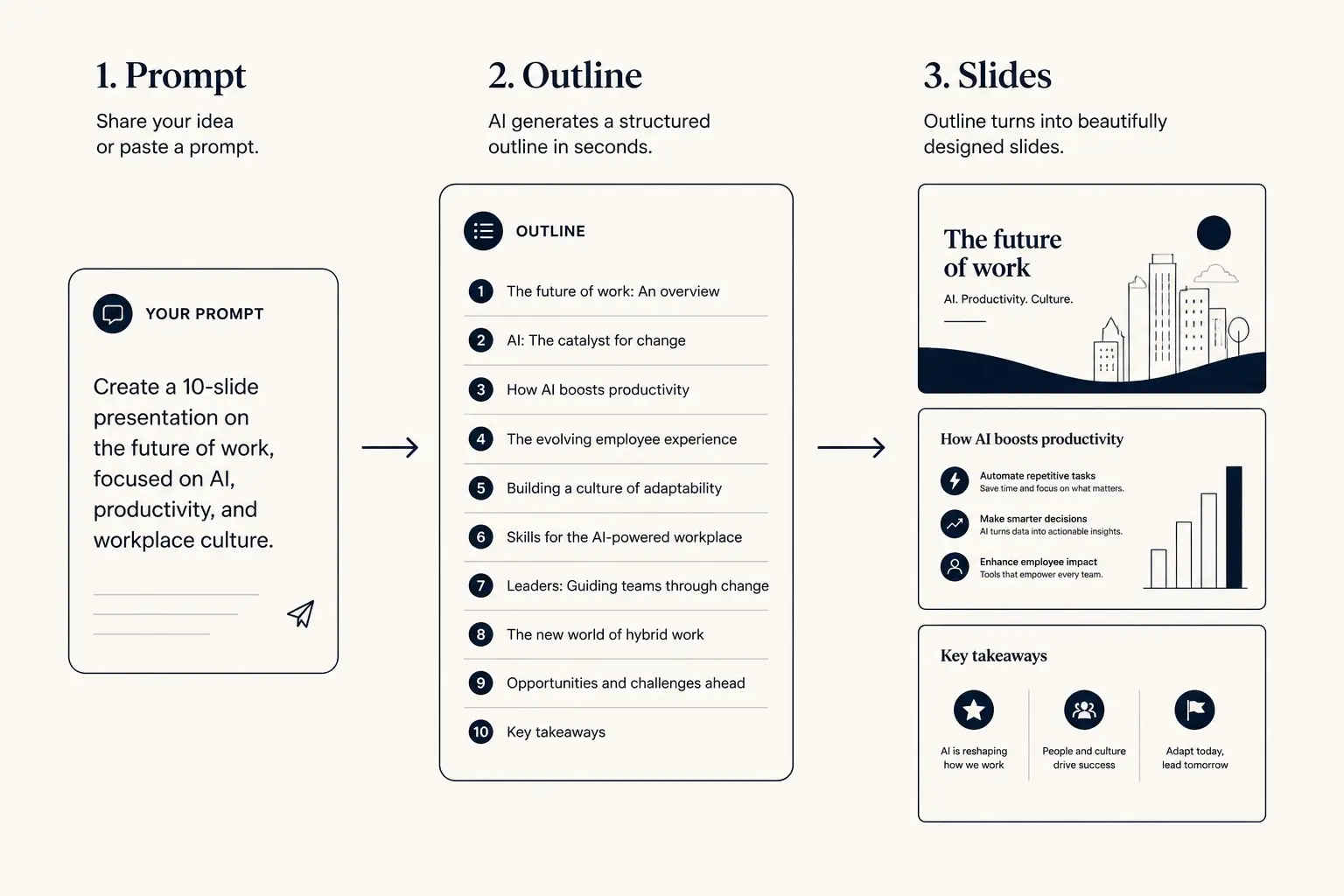
Prompt → outline → slides
1. Prompt
Audience, goal, length, proof you already have.
2. Outline
- • Opening claim
- • Proof beats
- • Ask / next step
3. Slides
Outline preview
- Narrative, open with Create a 14-slide procurement leave-behind optimized
- Body, 3–5 slides that carry the argument
- Close, summary, risks, and the ask
Preview only, Gamma expands this into editable slides.
Budget slides for file readers
Leave-behind PPTX often needs more slides than a live talk because the file must stand alone. Set minutes for the imagined reading time, raise density, and keep the ask explicit.
Slide budget calculator
Get a realistic slide count from meeting length and stakes, then open a matching prompt in Gamma.
18
Total slides
13
Core narrative
5
Appendix
Create a 18-slide deck for executives who skim. Meeting length: 20 minutes. Stakes: medium. Use an outline-first structure with 13 core narrative slides and 5 appendix slides. Every slide needs one claim and proof.
Open this budget in GammaWorked example: security-minded procurement pack
Scenario: your champion asked for a deck they can forward to security and procurement. You will not present. Numbers: manual process costs about $18k monthly, pilot showed 35 percent time reduction, implementation is six weeks, SSO is supported, data residency questions need clear answers. Bad approach: export a cinematic sales demo deck full of speaker jokes. Good approach: fourteen denser slides with ROI assumptions, security answers, implementation plan, and approval ask—layouts simple enough to survive export and printing.
Sample export after slide five includes the ROI table and a two-column security sheet. If columns collapse, simplify before building the rest. Name the file with date and version. When security requests a change, update the source deck and re-export rather than patching an orphaned attachment in email. Put the approval ask on its own slide with owner and date so the forward chain includes an action.
| Element | Present-link habit | PPTX habit |
|---|---|---|
| Density | Sparer; voice carries detail | Denser; assumptions visible on canvas |
| Overlays | Can be richer if tested live | Prefer simple stacks that survive export |
| Versioning | Latest edits win automatically | Named files plus a human handoff owner |
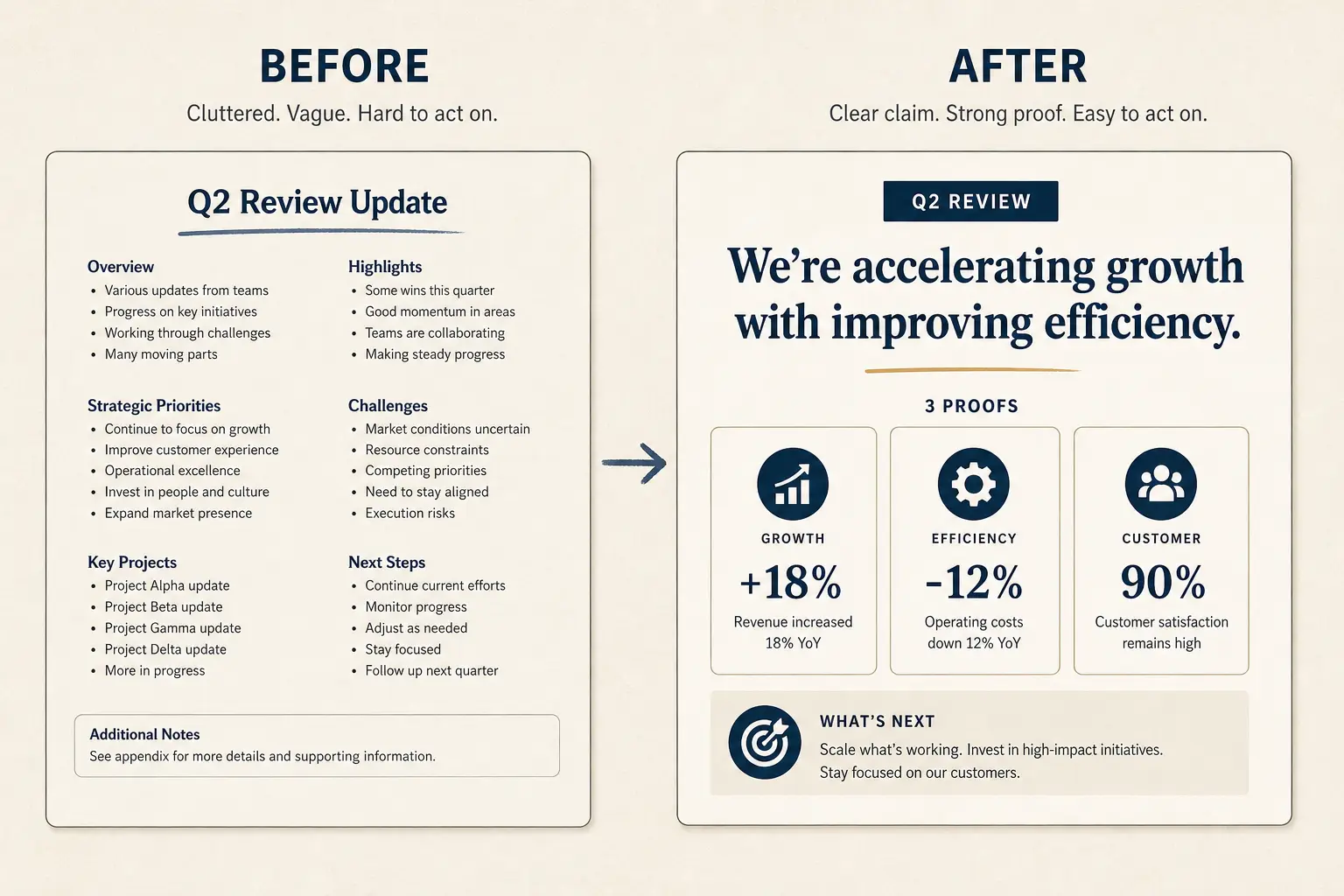
Slide density spectrum
Sparse
Live stage
1 claim, huge type
Balanced
Default
Claim + 3 proofs
Dense
Leave-behind
Detail for async read
PDF, PPTX, or link
Use a link for live control. Use PPTX when recipients must edit or drop slides into their world. Use PDF when you need a freeze that resists quiet edits. Many processes want PPTX even when PDF would be safer—clarify the real requirement. The AI PowerPoint generator page covers drafting mindset; this page covers the handoff mechanics.
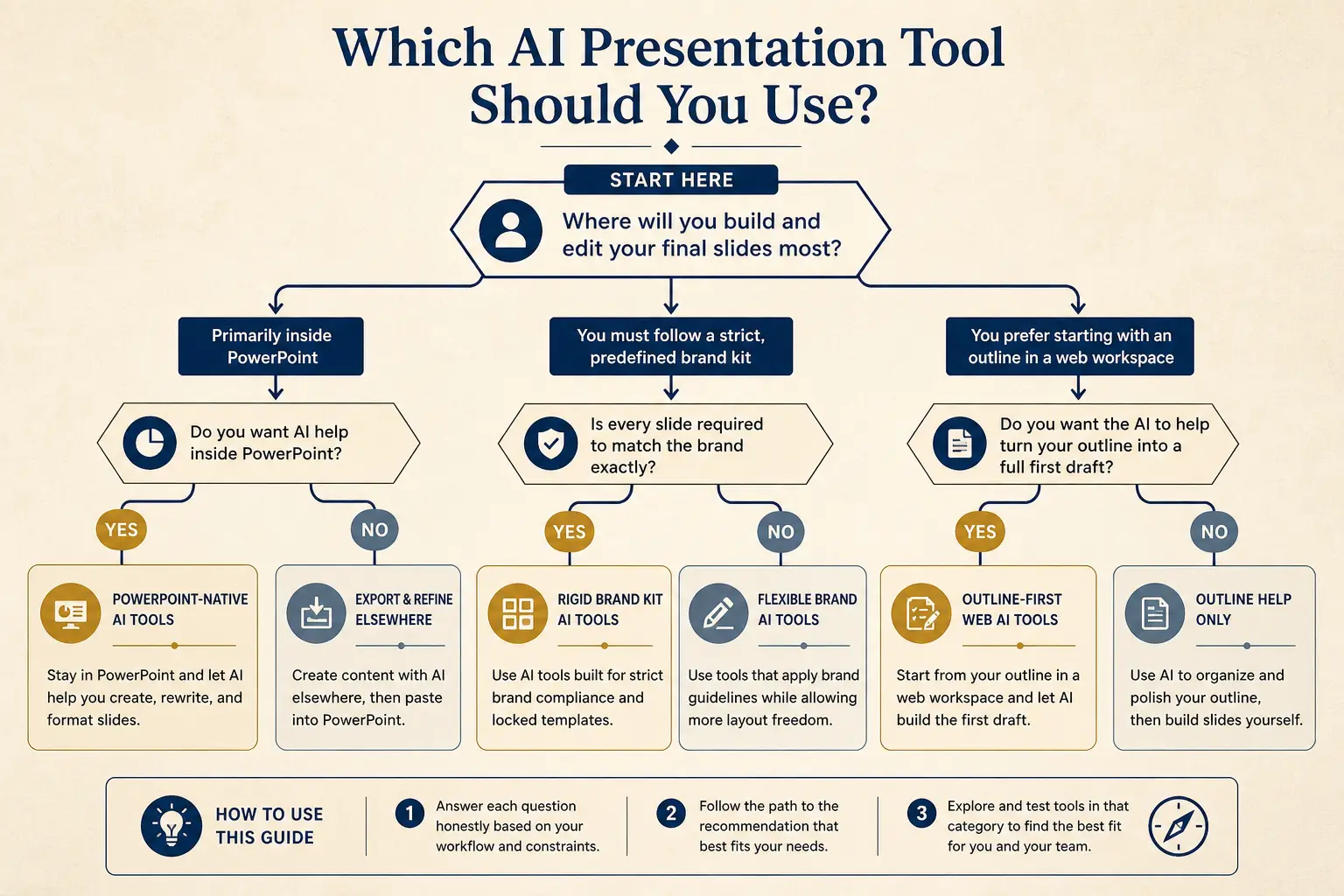
Which tool for which job
Need native PowerPoint editing every day?
Yes → Plus AI / Copilot · No → continue
Need rigid brand kits across a large team?
Yes → Beautiful.ai / enterprise kits · No → continue
Need outline-first AI drafting + present link?
Yes → Gamma
Mini comparison
| Constraint | Gamma path | Stay native PPT |
|---|---|---|
| Blank-canvas story | Draft in Gamma, export when required | Slower without a strong human outline |
| Locked master | Narrative draft only | Required for compliance packaging |
| Same-day number changes | Prefer present link if allowed | Attachment forks go stale quickly |
Operational habits after export
- Name files with date and version; retire old attachments in threads.
- Re-export after material number changes; do not patch only in email.
- Keep a short changelog slide if multiple teams edit the PPTX.
- Decide whether Gamma or PowerPoint is source of truth after handoff.
- Test print or PDF round-trip if the packet will be printed for a room.
Anatomy of a claim slide
Claim headline (one idea)
Supporting line that states the so-what for this audience.
Source / footnote
Failure modes that break PPTX handoffs
- Designing for cinematic present mode, then expecting identical PPTX.
- First export the night before with thirty fragile overlays.
- Speaker-only explanations on slides that will be forwarded.
- Orphaned attachments with stale numbers after silent email patches.
- Forcing PPTX when a present link would have been clearer.
- Believing export alone satisfies locked enterprise brand governance.
- Omitting HANDS until design polish locks bad density choices.
- No handoff owner, so three PPTX forks disagree on the ask.
Continue on the AI PowerPoint generator page for drafting framing, on document to presentation when your source is a doc, and on Plans for export access. Prefer a structured spine before export? Start in the templates library, then sample-export early. Workflow craft deepens under Learn. Compare Gamma versus PowerPoint and Copilot when you are choosing tools with Method’s rubric.
Team rules for file handoffs
Export to PPTX fails as a process more often than as a pixel problem. Appoint a handoff owner whenever a file leaves Gamma. That owner decides whether Gamma or PowerPoint remains source of truth for numbers. Without an owner, email threads accumulate forks with conflicting asks. AI cannot fix ownership ambiguity after the fact.
Create a sample-export checklist for every workstream that repeatedly needs files. The checklist should include one table slide, one chart slide, one dense text slide, and one ask slide. Export those four before building the rest. If anything breaks, simplify the layout system immediately. Waiting until slide thirty is how weekends disappear.
Name files with date, audience, and version. Retire old attachments explicitly in threads when a new export lands. Champions and procurement partners often forward the first file they receive. If you silently improve numbers later without a clear new version, your own process creates distrust. Version hygiene is part of export craft.
Train teams to write for skip-around readers whenever the deliverable is a file. Put assumptions on the canvas. Avoid punchlines that only work with a speaker. Place the ask where a skimmer still finds it. Present-link habits and PPTX habits are different sports; do not pretend otherwise.
For enablement libraries, decide module boundaries before export. A twenty-slide monolith is hard to maintain in PowerPoint. Smaller modules with clear titles are easier for facilitators to rearrange. Draft modules in Gamma so narrative coherence stays intact, then export for local editing habits.
When brand governance requires a locked master, treat Gamma as the thinking environment and PowerPoint as the packaging environment. Export narrative slides, then map them into the master. Do not expect export alone to satisfy approved icon libraries and legal claim locks. Honesty about that split prevents false expectations.
Finally, re-test export after major product design changes in Gamma. Fidelity characteristics can shift as layouts evolve. A quarterly sample export across common deck types catches regressions before a critical customer packet. Export to PPTX is an ongoing practice, not a one-time button press.
Procurement packets benefit from a one-page assumption index near the ROI slide. When AI drafts scattered footnotes, consolidate them. File readers screenshot tables into email threads; assumptions must travel with the math. This is a content structure choice that export fidelity alone cannot fix if you left critical caveats in speaker notes.
If your company uses both PDF freeze and PPTX editables, generate from the same outline and label each export’s purpose in the filename. Mixing an editable ask with a frozen archive without labels creates avoidable confusion. HANDS still applies: handoff owner, assumptions on canvas, no fragile overlays, density for readers, sample export early.
Frequently asked questions
Draft for the channel, then export on purpose
Open Gamma with HANDS in the brief. Sample export early, simplify layouts, and stop treating PPTX as an afterthought.