Learn · AI
AI presentations: guides & workflows
An AI presentation is not “ChatGPT pasted into PowerPoint.” It is a workflow where a model proposes structure and layouts, and a human keeps accountability for the argument. Done well, you spend minutes on a draft and your energy on edits that matter. Done poorly, you present fluent nonsense with nice margins.
This hub explains the category, outline-first workflows, prompting, and failure modes. Product deep-dives: AI presentation maker and create a presentation with AI. Evaluation: /method.
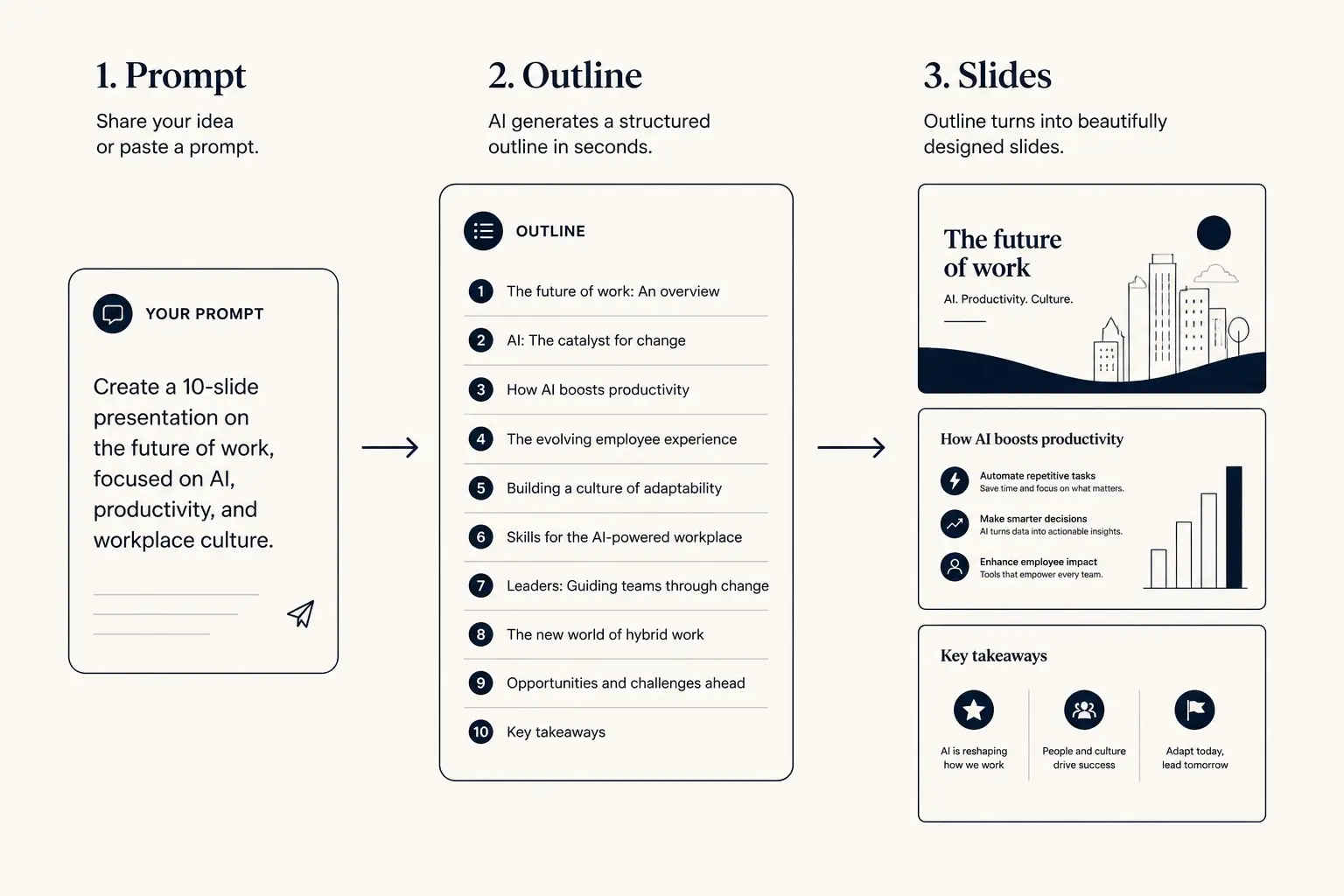
Prompt → outline → slides
1. Prompt
Audience, goal, length, proof you already have.
2. Outline
- • Opening claim
- • Proof beats
- • Ask / next step
3. Slides
What AI is good at, and bad at
- Proposing section order for a known job (pitch, QBR, lecture)
- Turning messy notes into a candidate outline
- Drafting speaker-ready phrasing you can tighten
- Suggesting layouts once the claims are clear
What AI is bad at: inventing your insight, knowing which metric is sacred to your CFO, and sensing when a slide will start an argument. Keep those human. Assign an owner for facts and an owner for narrative before you generate, AI drafts create a new failure mode: fluent slides nobody owns.
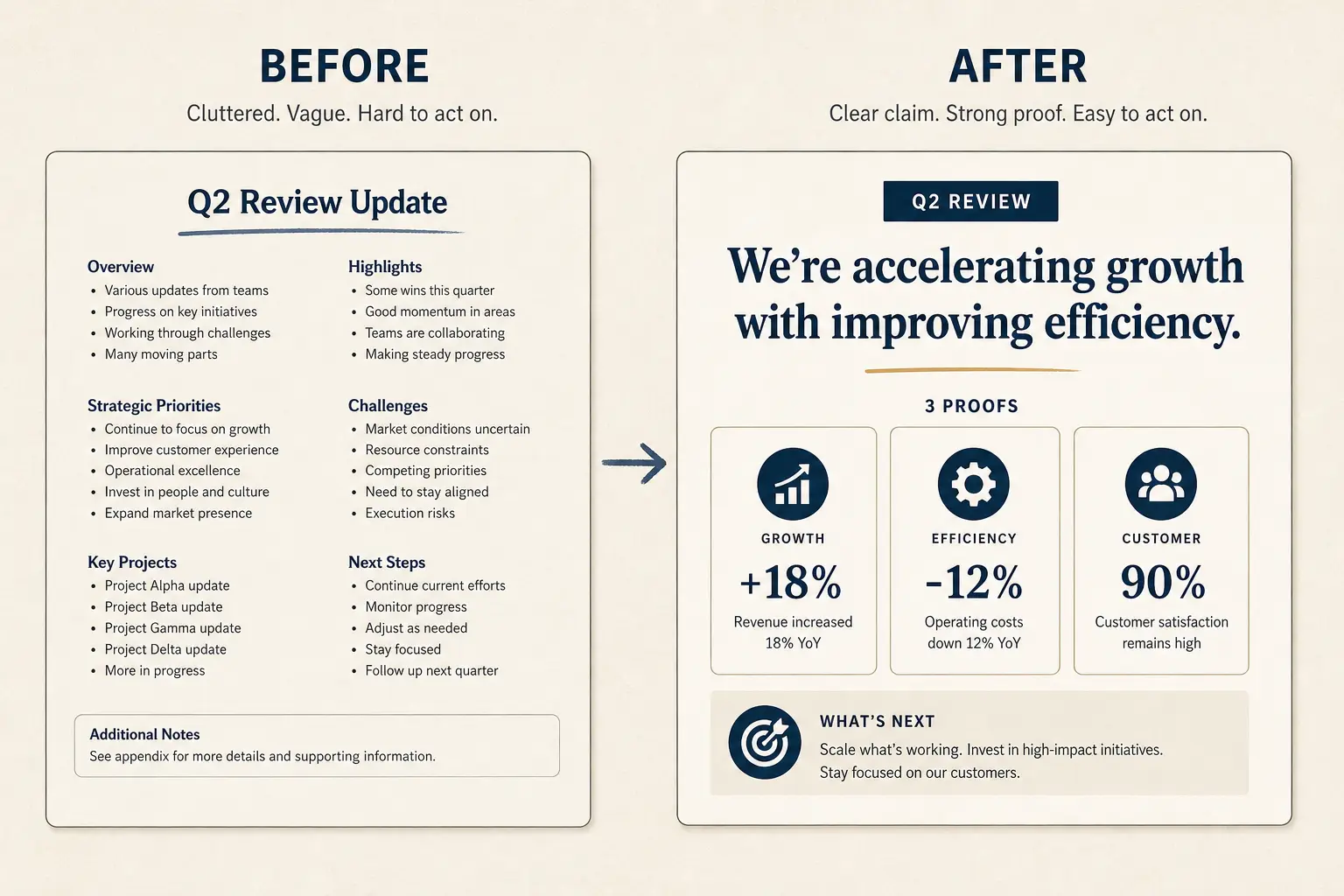
Weak slide → strong slide
Before
- • Overview
- • Features
- • Next steps???
After
- • Cost of status quo
- • Wedge in one claim
- • Proof + decision ask
Outline-first wins
Tools that jump to finished-looking slides encourage premature polish. Outline-first workflows let you reorder the story, kill weak sections, and inject real facts before layout commitments. When you change the narrative after generation, the tool should absorb the edit, that is the Editability axis in our rubric. Practically: spend the first pass entirely in outline form.
Prompting that produces usable decks
Specify audience, decision, length, tone, must-include facts, and forbidden fluff. Give stage and constraints (“seed pitch, 10 slides, no fake logos”). Ask for an outline before slides when the tool allows it. After the draft, prompt for diffs: “Rewrite traction with these three numbers; keep the ask slide.” Deep dive: prompt guide.
Time-to-usable-deck
Blank PPT path
Outline in docs → design fight → rebuild → 3–8 hours
Outline-first AI path
Prompt → edit outline → generate → polish → minutes to first usable draft
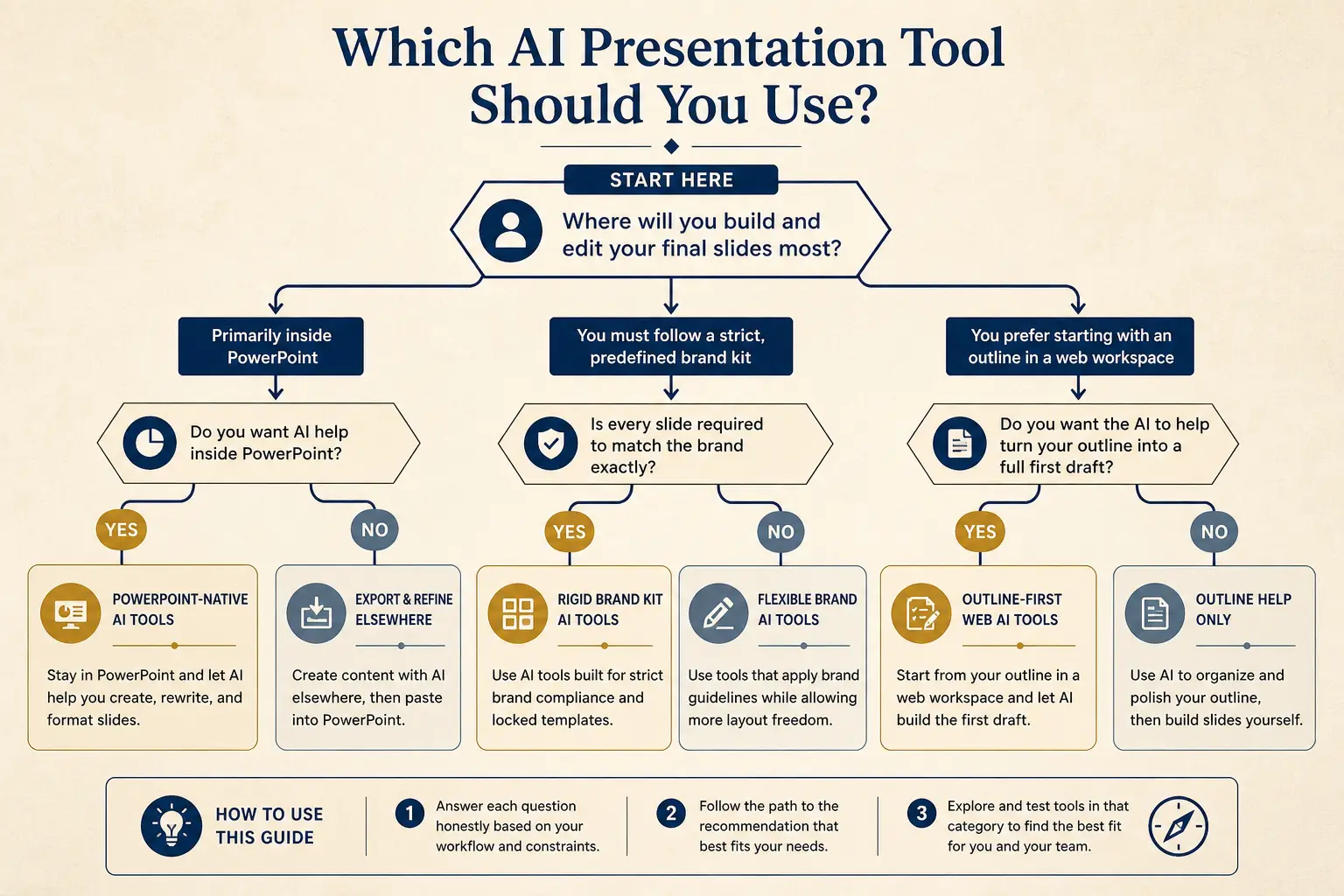
ChatGPT → slides workflows
Many teams still outline in chat and build elsewhere. That can work if you treat the chat as a thinking partner and the deck tool as the system of record. It fails when you copy walls of prose onto slides. See ChatGPT to PowerPoint and the blog ChatGPT outline to Gamma.
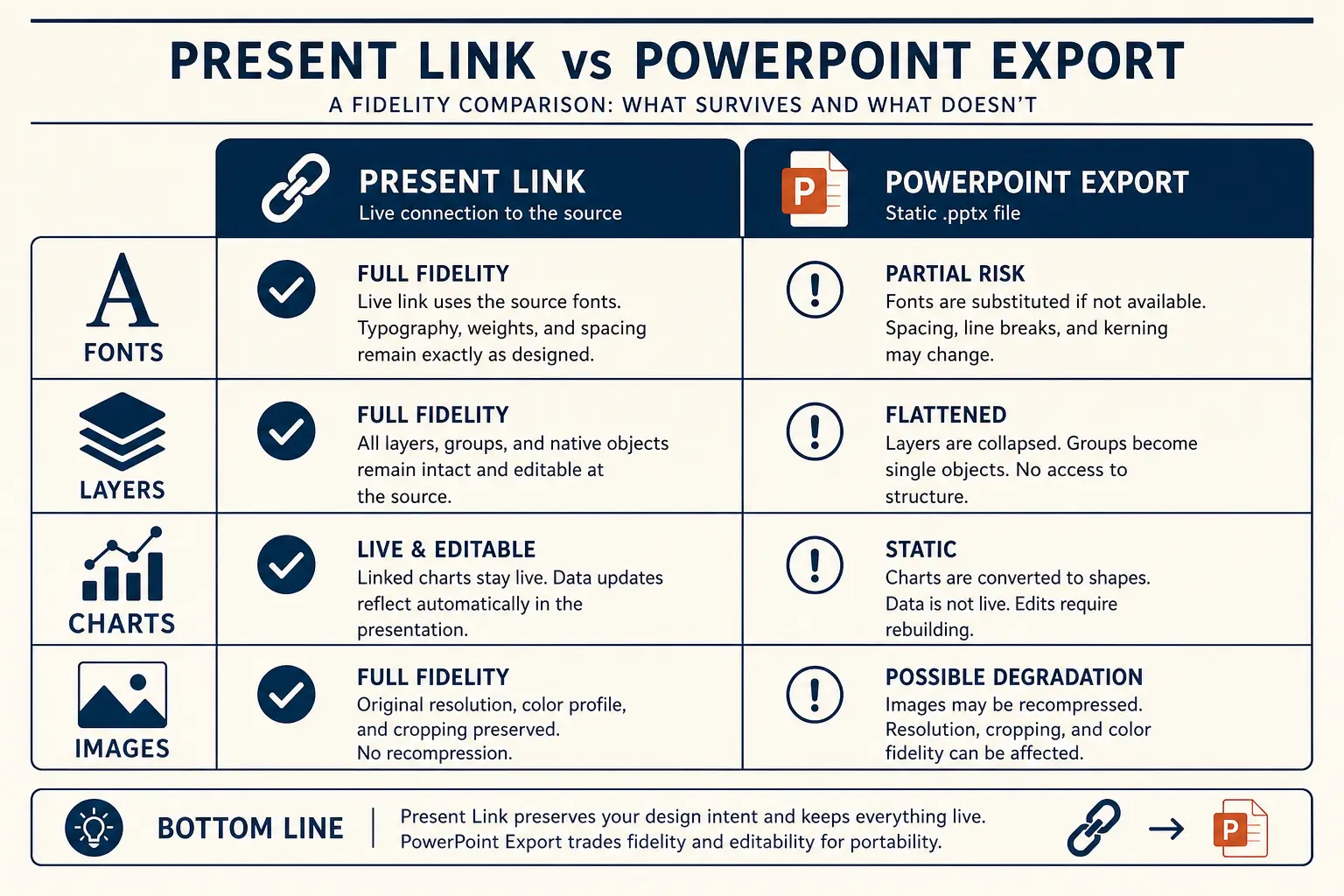
Present link vs PPTX fidelity
Present link
- • Live latest edits
- • Best for your room
- • Analytics-friendly
Export PPTX / PDF
- • Offline / procurement
- • Brand review in PPT
- • Expect cleanup passes
Framework: evidence-gap outline
For each section, tag H (have proof), N (need proof), or K (kill). Generate slides only after N tags are honest. This habit alone removes half of the “AI decks feel fake” problem. Pair with a forced edit: move one section and swap one metric, then score Editability.
Worked example: notes to QBR draft
PM pastes sprint notes and three scorecard metrics into Gamma with audience (VP Product), decision (fund reliability vs Feature X), length (12 slides). Outline marks causality as N until the PM writes the recommendation. Slides generate after that sentence exists. Forced edit: decision to slide two. Present link in the room; PDF for pre-read.
Evaluation rubric axes
Mistakes to avoid
- Accepting the first outline without injecting proprietary facts
- Optimizing visuals before the ask is clear
- Trusting invented customer quotes or market numbers
- Ignoring export/present constraints until the night before
- Using the same prompt for pitch, sales, and classroom jobs
Not for you if…
You need AI to replace judgment on regulated claims. You already have a finished deck and only need micro-edits inside PowerPoint. You want a permanent “best tool” trophy without a job, read how we evaluate instead.
Frameworks, worked rules, and cuts
An AI presentation is a workflow where a model proposes structure and layouts while a human keeps accountability for the argument. It is not chat pasted into PowerPoint. Done well, you spend minutes on a draft and energy on edits that matter. Done poorly, you present fluent nonsense with nice margins and nobody owns the facts.
Original framework: Evidence-Gap Outline. For each section tag have-proof, need-proof, or kill. Generate slides only after need-proof tags are honest. This habit removes much of the AI decks feel fake problem because fakeness is usually missing facts, not missing gradients. Pair with a forced edit that moves one section and swaps one metric.
Worked example: a PM pastes sprint notes and three scorecard metrics with audience VP Product, decision fund reliability versus Feature X, and a twelve-slide cap. Outline marks causality as need-proof until the PM writes the recommendation sentence. Slides generate after that sentence exists. Forced edit moves decision to slide two. Present link in the room; PDF for pre-read.
Outline-first wins because finished-looking first drafts encourage premature polish. Tools should absorb narrative reorders without wiping local edits. That is Editability on the public rubric. Prompt with audience, decision, length, tone, must-include facts, and forbidden fluff. Then prompt for diffs rather than full regenerations when possible.
ChatGPT can remain a thinking partner if the deck tool is the system of record. It fails when walls of prose become slides. Assign an owner for facts and an owner for narrative before you generate. Fluent slides nobody owns are a new organizational failure mode created by AI drafting.
Failure modes include accepting the first outline without proprietary facts, optimizing visuals before the ask is clear, trusting invented quotes or market numbers, ignoring export constraints until the night before, and using one prompt for pitch, sales, and classroom jobs. Job-specific prompts beat universal magic strings.
Not for you if regulated claims cannot be model-assisted, if you only need micro-edits inside an existing PowerPoint file, or if you want a permanent best-tool trophy without naming a job. Evaluate with the five-axis method instead of screenshots. Name the artifact before you crown a winner.
Concrete next step in Gamma: write an evidence-gap outline for tomorrow's meeting, inject three real facts, generate, force a reorder, and score the tool as if you were publishing a compare. Keep the loop that survives the forced edit. Discard workflows that require a full restart to change one metric.
Prompt anatomy that usually works: audience, decision, slide cap, tone, must-include facts, and forbidden fluff in one block. Then ask for an outline only. After the outline passes a title-only read, generate slides. When something is wrong, request a diff prompt naming the section and the change rather than regenerating the whole deck.
Honesty scoring matters for AI drafting as much as for vendor compares. If the model invents a quote, logo, or market number, that is an Honesty failure even if Design looks sharp. Red-team the draft by asking which claims would survive a hostile associate with access to your sheet.
Export timing is a craft decision. Present-link rooms tolerate late outline surgery; PPTX-bound rooms need an earlier freeze and a cleanup budget. Decide the artifact before you accept interactive flourishes that will not survive export. The export map spoke exists for that constraint, not as optional trivia.
Compare AI presentation tools with a junior operator on the same brief, not only your best storyteller. Senior operators paper over Editability gaps. If a forced reorder takes more than a few minutes or wipes local edits, score Editability low regardless of homepage aesthetics.
Mistakes to kill early: accepting invented market sizes, keeping topic titles because they look neat, and regenerating the whole deck when one metric changed. Diff prompts and evidence tags are slower for thirty seconds and faster for the rest of the night.
When evaluating AI presentation makers, run the same evidence-gap brief twice: once with proprietary facts, once without. The gap between those drafts is the Honesty and Structure signal. Screenshots of hero slides hide that gap on purpose. Publish the brief you used so teammates can re-run it after vendor launches.
Create an outline-first deck
Describe the audience and decision. Edit structure before you present.