Learn · AI
From text to slides without pasting a memo onto a theme
Text-to-slides fails when you paste paragraphs and hope a theme saves you. It works when you compress text into an outline of claims, budget the room, then generate slides from the outline. The hard step is compression, AI can help, but you must approve the claims.
This guide is built for people sitting on memos, docs, or ChatGPT essays who need a meeting artifact by tomorrow. Skip it if you want every sentence from the memo preserved on slides, or you have no decision to force in the room. Pair it with outline-first, document to presentation, and notes to slides. Every section below either teaches a decision rule or shows a worked failure, no synonym padding, no “in today’s world” throat-clearing, no keyword soup.
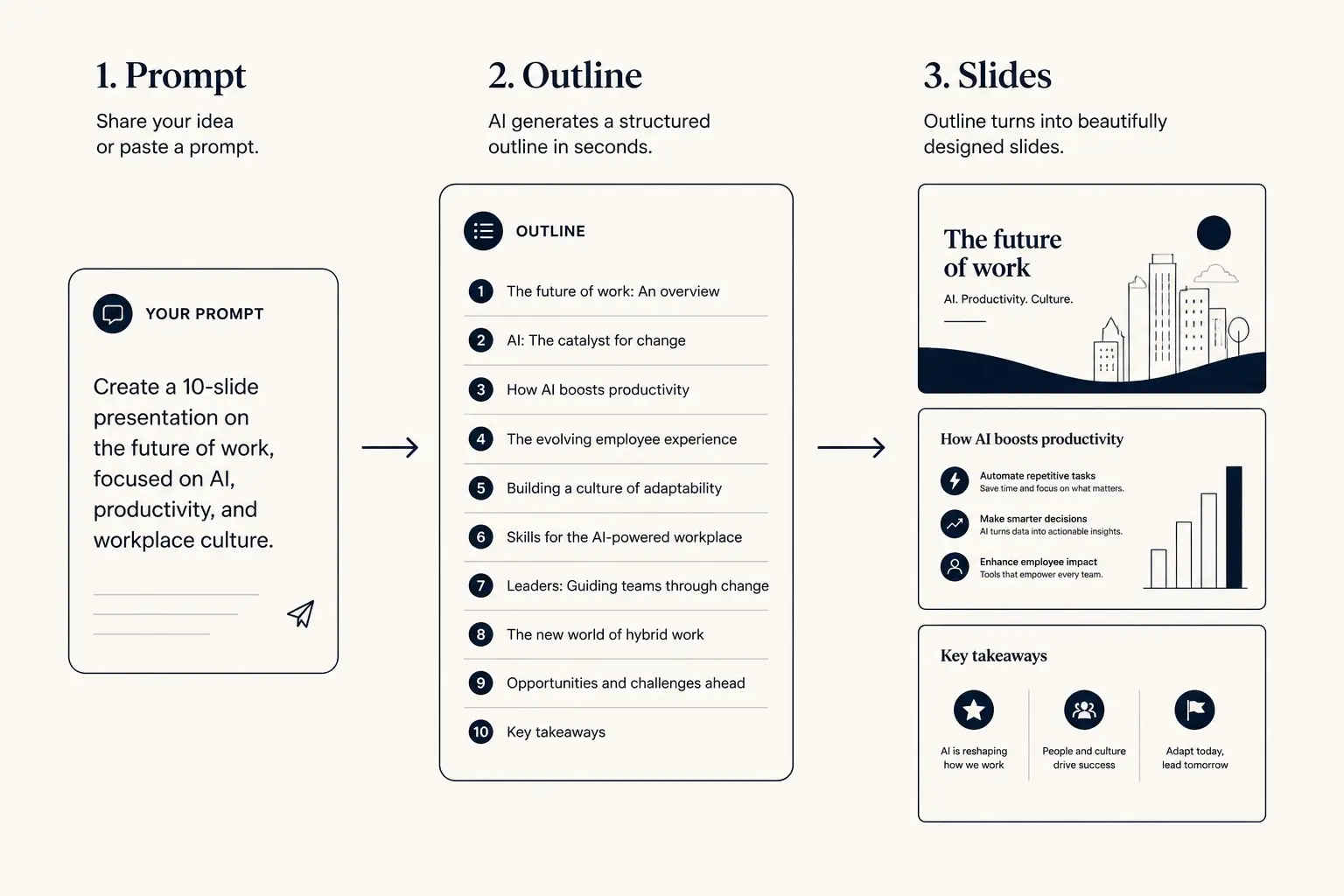
Prompt → outline → slides
1. Prompt
Audience, goal, length, proof you already have.
2. Outline
- • Opening claim
- • Proof beats
- • Ask / next step
3. Slides
Who text-to-slides conversion is for, and the honest not-for
Read this if you are among people sitting on memos, docs, or ChatGPT essays who need a meeting artifact by tomorrow You will get leverage here if you already have a decision to force and a short list of proof you can defend in Q&A. The fastest way to waste a week is polishing slides before the decision job is named.
Not for you if you want every sentence from the memo preserved on slides, or you have no decision to force in the room In that case, fix the upstream artifact first, whiteboard, memo, or metric glossary, then return. Gamma amplifies clarity and confusion at the same speed. We would rather you delay generation than ship a confident fiction that collapses in the first associate question.
Decision rule: if you cannot state the audience, the decision, and the proof inventory in four sentences, you are not ready for slides. Write those four sentences in a doc, then open a generator. If your four sentences disagree with each other, resolve the disagreement before you touch typography.
Compress → budget → render
Use Compress → budget → render as the operating checklist. It is intentionally rigid. Investors, executives, and operators parse familiar structure as a trust signal; novelty belongs in the wedge and the proof, not in reinvented sequencing that forces the room to decode your originality.
1. Highlight the decision and three proofs in the source text. 2. Compress to claim titles (human approve). 3. Set slide budget from minutes. 4. Render slides from titles, not from raw paragraphs. 5. Park leftover density in appendix or a leave-behind variant.
Bend the framework only when a stronger asset earns an earlier slot, for example, putting traction before market when traction is undeniable and the meeting is twelve minutes. Do not bend it because a template looked prettier in another order. When you bend, say why in a speaker note so collaborators do not “fix” it back to generic order by accident.
Proof inventory before pixels
Build a one-screen proof inventory before generation: decision wanted; audience titles; five to twelve metrics with time windows; two customer or operational outcomes; constraints you will not claim; ask or next step terms. That inventory is the only numeric source of truth. Missing numbers become TBD, never model guesses.
Category titles are a failure mode across every deck job. Overview, Solution, Traction, and Next Steps force the room to dig. Claim titles carry skim: name the cost, the wedge, the metric, or the decision. Run a title-only pass before you debate colors. The interactive on this page exists to force that rewrite into something you can paste into Gamma.
One home per metric. If ARR appears on title, traction, and ask, the windows and definitions must match. Associates compare slides side by side; inconsistency reads as spin even when it was only sloppy editing.
Time-to-usable-deck
Blank PPT path
Outline in docs → design fight → rebuild → 3–8 hours
Outline-first AI path
Prompt → edit outline → generate → polish → minutes to first usable draft
Slide budget, density, and the skim test
Meeting length and stakes set slide count; design fills the budget. A twelve-minute partner intro cannot carry eighteen narrative slides without becoming a speed-read disaster. Live rooms stay on the sparse end of the density spectrum; leave-behinds can densify without changing the spine. Use the calculator when this page includes one, then lock the number in your prompt so the model does not invent a tour.
Run the title-only skim: export titles, read them aloud in under ninety seconds, and ask a stranger in your sector to restate the story. If titles are categories, you do not have a narrative yet. Claim titles carry skim; body copy is for the curious. Rehearse with a timer before you change design, founders who practice the spine aloud fix title weakness faster than founders who tweak fonts.
Live versus leave-behind is a structure choice. Live decks can be thinner because you are in the room. Leave-behinds need self-sufficient claims. Do not email a live skeleton as a cold attachment unless you enjoy follow-up confusion.
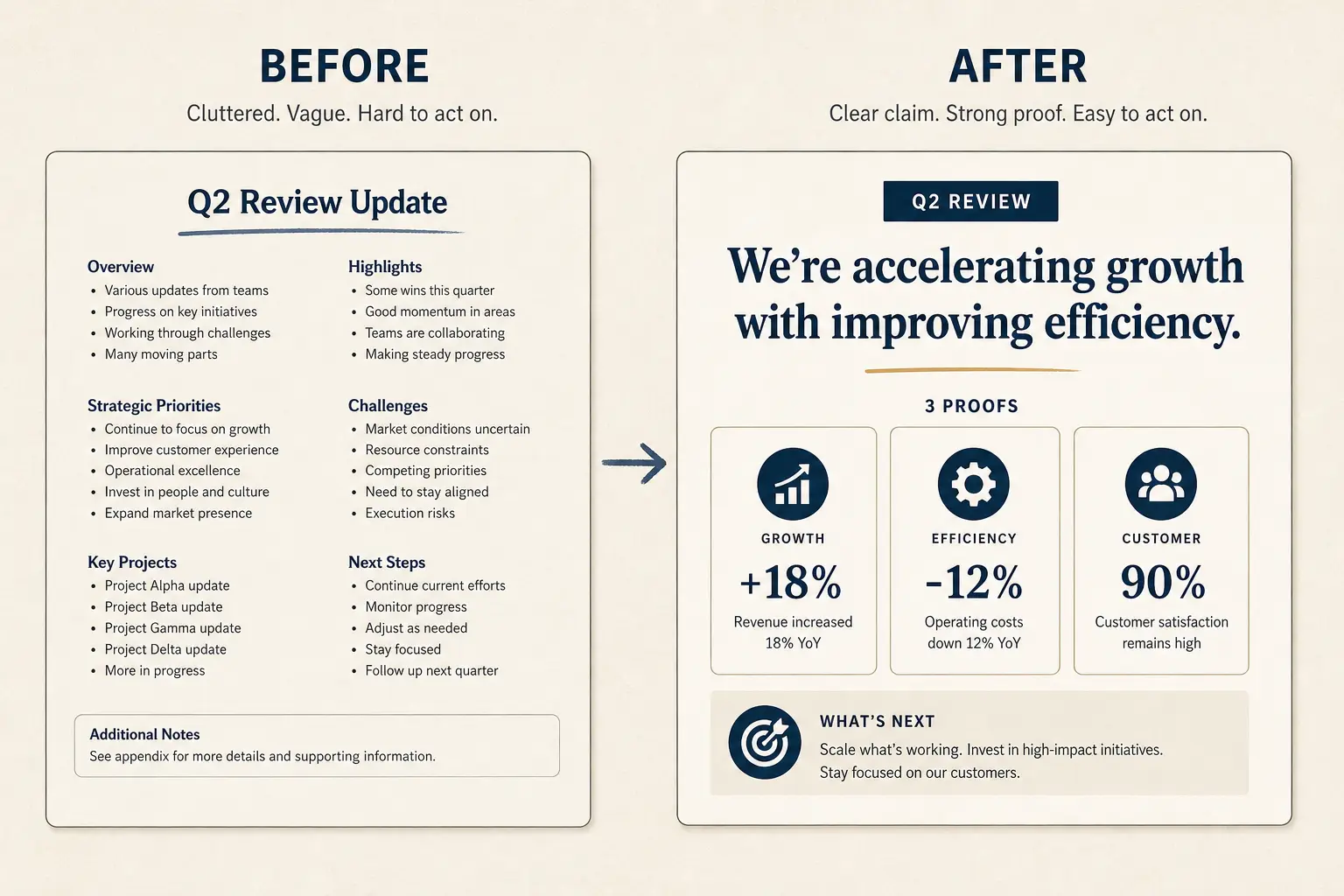
Worked example with specifics
Three-page Notion strategy memo → Monday all-hands slides.
Before: pasted sections into twelve slides; presenters read paragraphs aloud; chat asked what we were deciding.
After: eight claim titles; decision on slide one; two metrics homes; appendix held the framework table. Meeting ended with owners and dates.
Decision rule from this example: if a sentence is essential but not a claim, it belongs in notes or appendix, not as a wall of body text. If you cannot map your own proof into the after state, you are missing inventory, not design talent. Steal the transformation pattern, not the fictional company’s numbers.
Deep dive, text-to-slides conversion
Compression is editorial judgment. AI can propose cuts; humans decide which political sentences die. If everything is important, nothing is a presentation.
Source fidelity means not inventing, it does not mean preserving length. A faithful slide deck can be ten percent the word count of the memo and one hundred percent of the decision.
For fundraising text (data room memos), do not auto-slide the whole room. Extract the persuasive spine into a deck; leave diligence in the room. See data room versus deck.
Failure modes, what to cut
Cut these without ceremony:
• Paragraph paste. • Keeping every stakeholder’s pet section. • No live vs leave-behind split. • Screenshots of docs as slides. • AI expansion that lengthens instead of compresses.
Cutting is a structure skill. Partners and operators rarely complain that a deck was too short when every remaining slide earns its minute. They do complain, silently, when they cannot find the ask or the decision. If a slide does not change a belief about problem, wedge, proof, or next step, demote it to appendix or delete it. Empty slides kept “because the template had them” are still empty.
Outline preview
- Hook, set up Compress this memo into 8 claim
- Evidence, proof, metrics, or examples
- Ask, decision or follow-up
Preview only, Gamma expands this into editable slides.
Weak bullets → claim/proof/ask
Paste a bad slide. Get a rewrite pattern you can drop into Gamma, not vibes, a structure.
- Claim: The Problem (make the cost of inaction obvious)
- Proof: Our Solution (add a number, name, or constraint)
- Proof: Market Opportunity (add a number, name, or constraint)
- Proof: Traction (add a number, name, or constraint)
- Ask: The Ask (one decision, one owner, one date)
Evaluation rubric axes
Interactive practice, then regenerate surgically
Use the interactive on this page to produce an output you can paste into Gamma, a slide budget, a constrained prompt, or a claim rewrite. Do not treat toggles as decoration. The output should name audience, length, and proof constraints. If the interactive output is vague, your inputs were vague, tighten them before generating slides.
When a section is weak, regenerate that section only. Full-deck rerolls reshuffle metaphors and sometimes invent metrics. Keep a frozen outline document beside Gamma so you can diff titles between versions. Version when claims change, not when a theme color changes. Two to four surgical regenerations beat one magical reroll.
Honesty rule for AI assists: if a number does not appear in your proof inventory, delete it even when it sounds helpful. Helpful fiction is still fiction. Flag unknowns as TBD rather than letting a model guess. Search the deck for digits you did not type before any external forward.
Stage, artifact, and export choices
Stage changes proof weight, not the right to invent. Pre-seed can overweight insight and design-partner signal. Seed needs a clearer wedge and early revenue or strong usage. Series A must show repeatable acquisition and unit economics that survive associate models. Board packs and investor updates are different jobs from pitches, do not paste the raise narrative into a board meeting and call it stewardship.
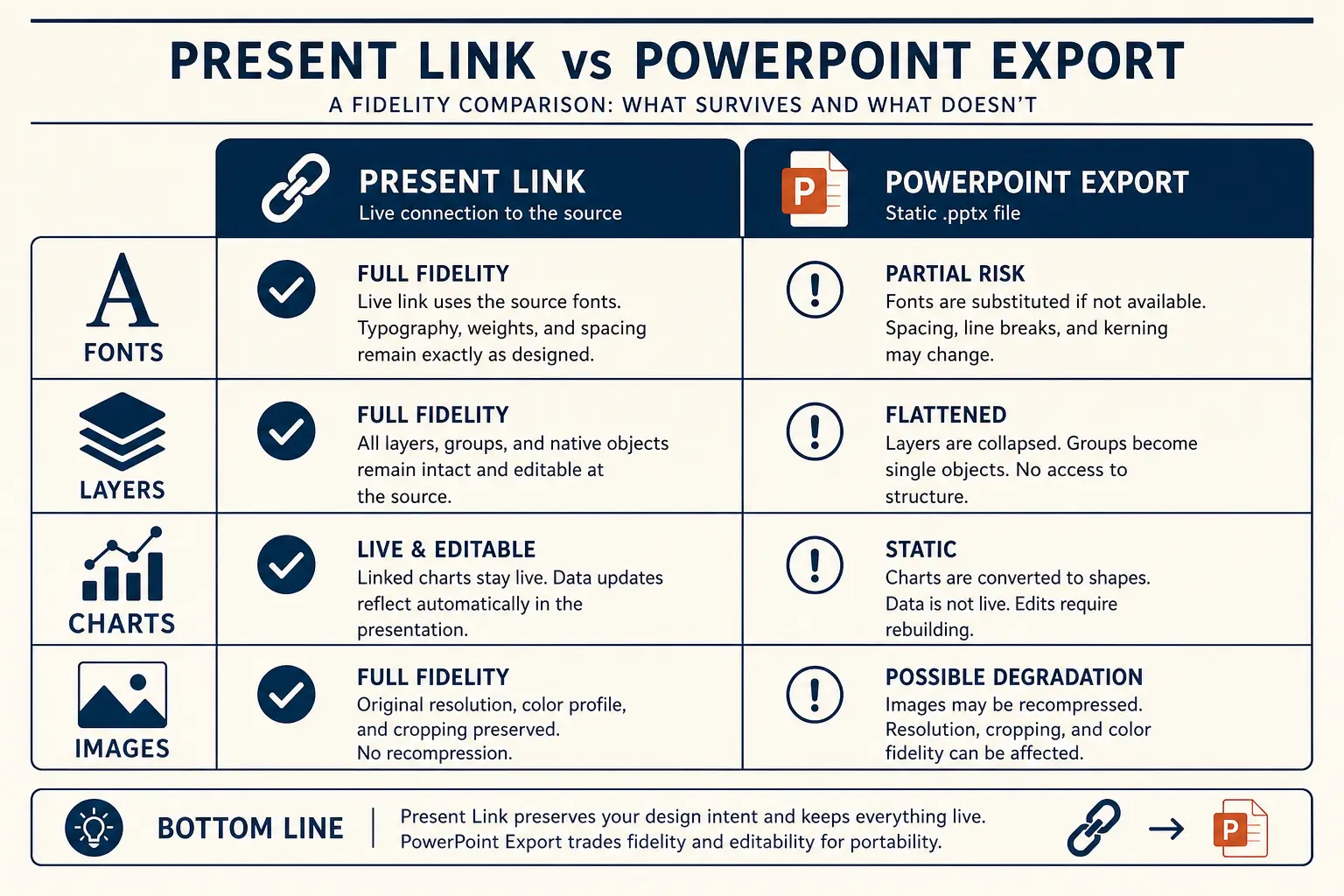
Present-link when you control the room and metrics will move this week. Export PPTX when a firm process demands markup in a file. Structure survives export only when hierarchy was real in the outline. See export to PPTX and Method when you need fidelity and evaluation language.
Appendix and data room hold density: cohort charts, legal, security, deep competition grids. Label jumps so associates can find methodology. Never open a live meeting in the appendix. Never confuse a persuasive deck with a diligence room, see data room vs deck when the boundary blurs.
Collaboration, Q&A, and revision hygiene
Decks fail in collaboration as often as they fail in content. Name an owner for the spine, an owner for metrics, and a freeze time before the meeting. Late drive-by edits that change ARR windows without updating the ask create diligence traps. Put the metric glossary in speaker notes so a co-founder can update a number without rewriting the narrative voice.
Prepare Q&A from the slides you almost cut. The appendix exists so you can jump when challenged without stuffing the live arc. If a question requires a new slide you do not have, write the answer in a follow-up memo, do not invent a chart mid-call. For AI-assisted decks, keep the prompt and inventory beside the file so revisions regenerate from truth, not from the previous hallucination.
Revision hygiene: change one variable per pass when possible, titles, then proof, then density, then visual theme. Mixing all four in one frantic hour is how teams lose the plot. If stakeholders disagree on story, resolve the disagreement in a one-page memo before regenerating slides again.
Pre-send checklist
• Decision extracted. • Titles approved before render. • Budget set. • Leftovers parked. • Notes hold definitions. • Orphan digits searched.
After the checklist, send titles only to a peer outside your company. If they can pitch the story back, you are ready for design polish. If they ask what you sell or what you want, return to the claim clinic before any external forward. Good structure reduces cognitive load so the room spends time on your wedge, not decoding order. Version the file when structure changes and note what moved, associates running parallel processes deserve a changelog, not a surprise.
Operating notes for text-to-slides conversion
Operating note for text-to-slides conversion: write the decision sentence before you open any generator. If two stakeholders write different decision sentences, stop and reconcile. Tools cannot merge political disagreement into a clean skim path. Once the decision sentence is shared, lock it at the top of the outline and refuse slides that do not advance it.
Operating note for text-to-slides conversion: keep a living metric glossary with definition, window, inclusion rules, and owner. When AI regenerates a section, paste the glossary entries that section may use. If a regenerated slide introduces a synonym metric with a new window, treat it as a defect even if the number looks flattering.
Operating note for text-to-slides conversion: schedule a peer skim with someone outside the building of the deck. Give them titles only for ninety seconds. If they cannot restate audience, wedge or core tension, and ask or next step, you are not ready for visual polish. Peer skims catch category titles faster than internal reviews.
Operating note for text-to-slides conversion: separate live and leave-behind variants explicitly. Name files or Gamma versions with live or leave-behind in the title. Mixing densities without labels creates accidental forwards, the sparse live deck arrives cold, or the dense leave-behind gets presented at double speed.
Operating note for text-to-slides conversion: when you export, record why you exported. Process requirement, markup request, or archival snapshot are valid reasons. Exporting because it feels more real is not. Prefer present links while claims are still moving; export dated snapshots when a thread needs a frozen artifact.
Operating note for text-to-slides conversion: treat appendix as a jump list, not a junk drawer. Every appendix slide needs a label an associate can request by name. If you cannot name why a slide is in appendix versus main narrative, cut it from both and put the file in the data room instead.
Operating note for text-to-slides conversion: timebox generation and expand edit. A useful default is fifteen minutes to generate an outline, forty-five minutes to edit claims, then a second ten-minute generate for weak sections only. Teams that invert that ratio collect pretty drafts and late nights.
Operating note for text-to-slides conversion: write the not-for audience into the prompt when relevant. Models default to broad usefulness and sand down sharp edges. If the deck is not for enterprises, not for consumers, or not for Series A density, say so. Negative audience constraints reduce generic filler more than another adjective about being concise.
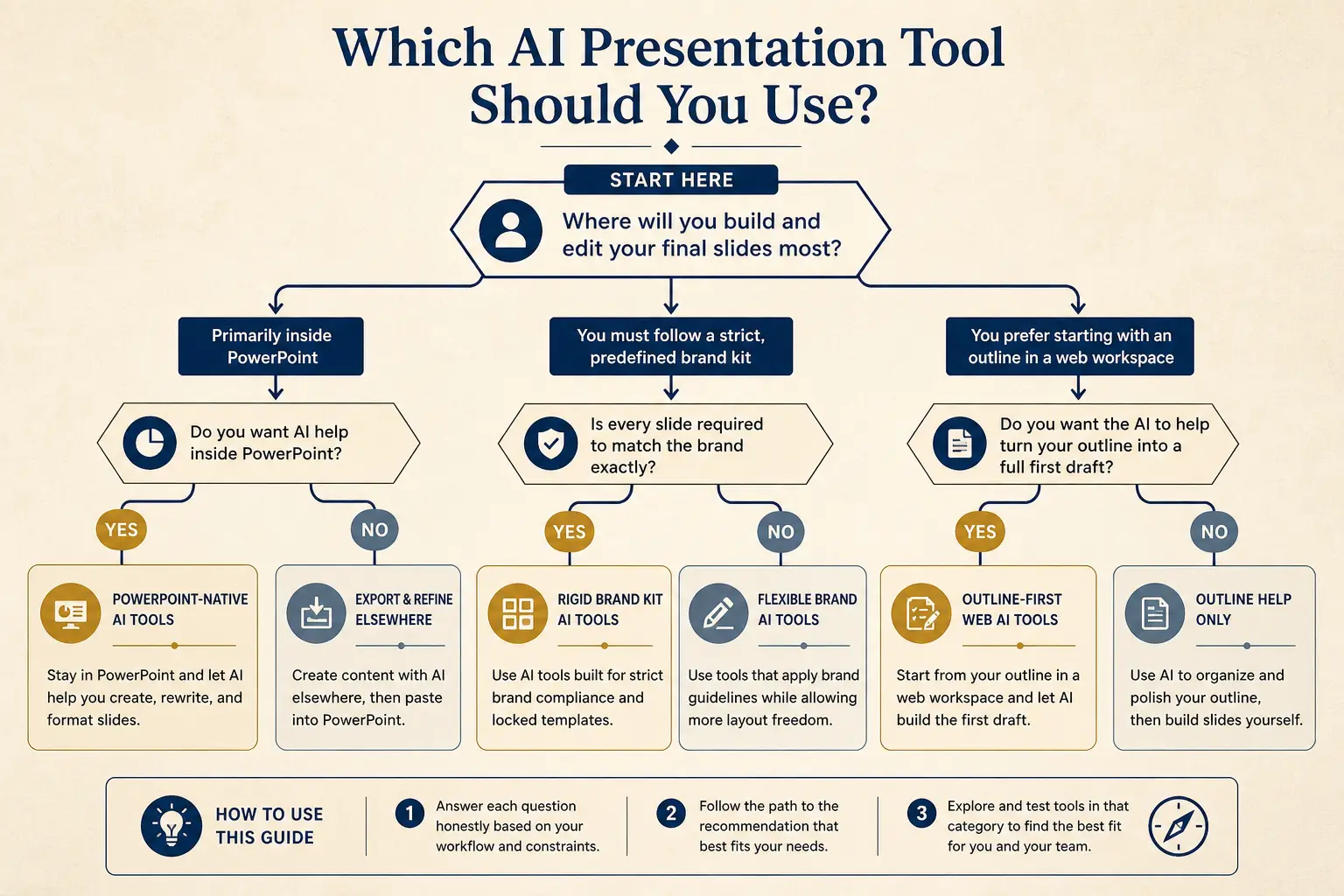
Weak slide → strong slide
Before
- • Overview
- • Features
- • Next steps???
After
- • Cost of status quo
- • Wedge in one claim
- • Proof + decision ask
Gamma bridge, concrete next step
Paste compressed titles into Gamma, not the raw memo. Use document-to-presentation patterns when the source is long, but still approve the outline.
Concrete next step in Gamma: open Gamma, paste the constrained prompt from this page’s interactive output, freeze section order, generate outline first, run a title clinic, regenerate at most three weak sections, rehearse on a present link, then export only if a process demands a file. Score the result on Method before you send. Browse examples for shape, never copy someone else’s metrics. If you need fundraising-specific artifacts after the pitch, continue through the fundraising hub rather than overloading one deck with every job.
If you are comparing tools after the draft, use compare pages with Method language, structure, honesty, editability, export, instead of feature bingo. Billing and plan limits live on billing; product CTAs still route through login until create entry is public. The teaching goal of this page is judgment; the product goal is a faster honest draft.
Frequently asked questions
Convert an outline to slides in Gamma
Compress text into claim titles first, then generate slides from the outline, not the essay.