Workflows
Document to presentation AI that cuts before it designs
Gamma turns notes, briefs, and docs into structured presentations—after you extract the decision and must-keep claims. Outline first, delete tourism, then generate editable slides you can present or export. Long documents do not earn long decks by default.
Who document to presentation is for
Use this workflow when the thinking already lives in writing—discovery notes, PRDs, Notion briefs, research memos, meeting minutes—and you need a deck for a timed room. It fits consultants, PMs, teachers, founders, and operators who refuse to retype the same argument into a blank slide grid. The shared pattern is surplus source text and a scarce minute budget.
- Consultants converting workshop notes into client-ready follow-ups.
- PMs turning PRDs into exec review decks with a ship decision.
- Teachers transforming memos into paced lecture paths.
- Founders turning investor memos into visual update or pitch spines.
Not for you if…
If the document is the better artifact, keep it as a memo. If legal requires exact controlled wording with no restructuring, attach the source instead of regenerating. If you have no decision and hope AI will invent one from a brain dump, pause—choose the ask first. And if the source is mostly confidential speculation, do not paste it wholesale into a generator.
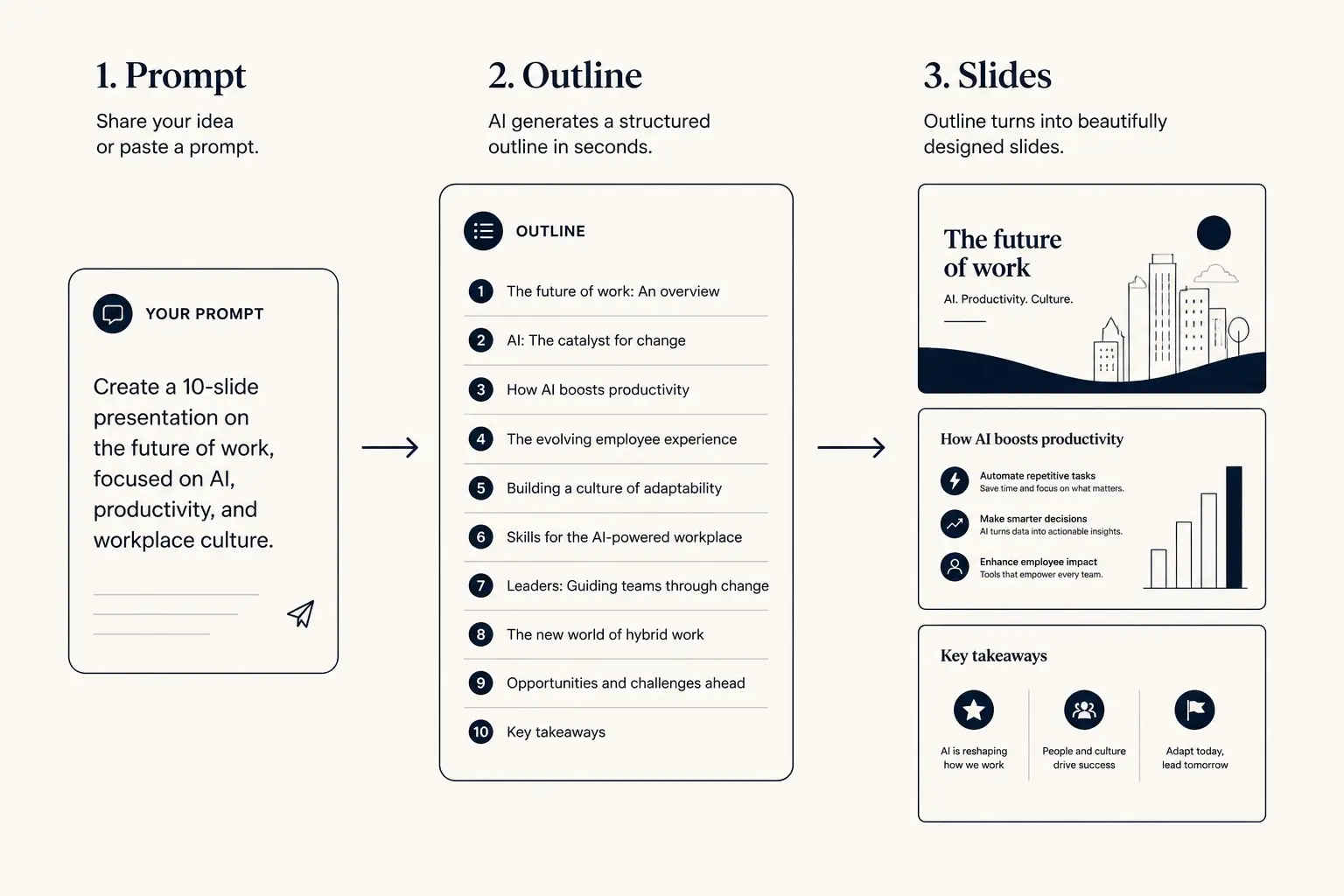
Prompt → outline → slides
1. Prompt
Audience, goal, length, proof you already have.
2. Outline
- • Opening claim
- • Proof beats
- • Ask / next step
3. Slides
The CUTS framework before you paste
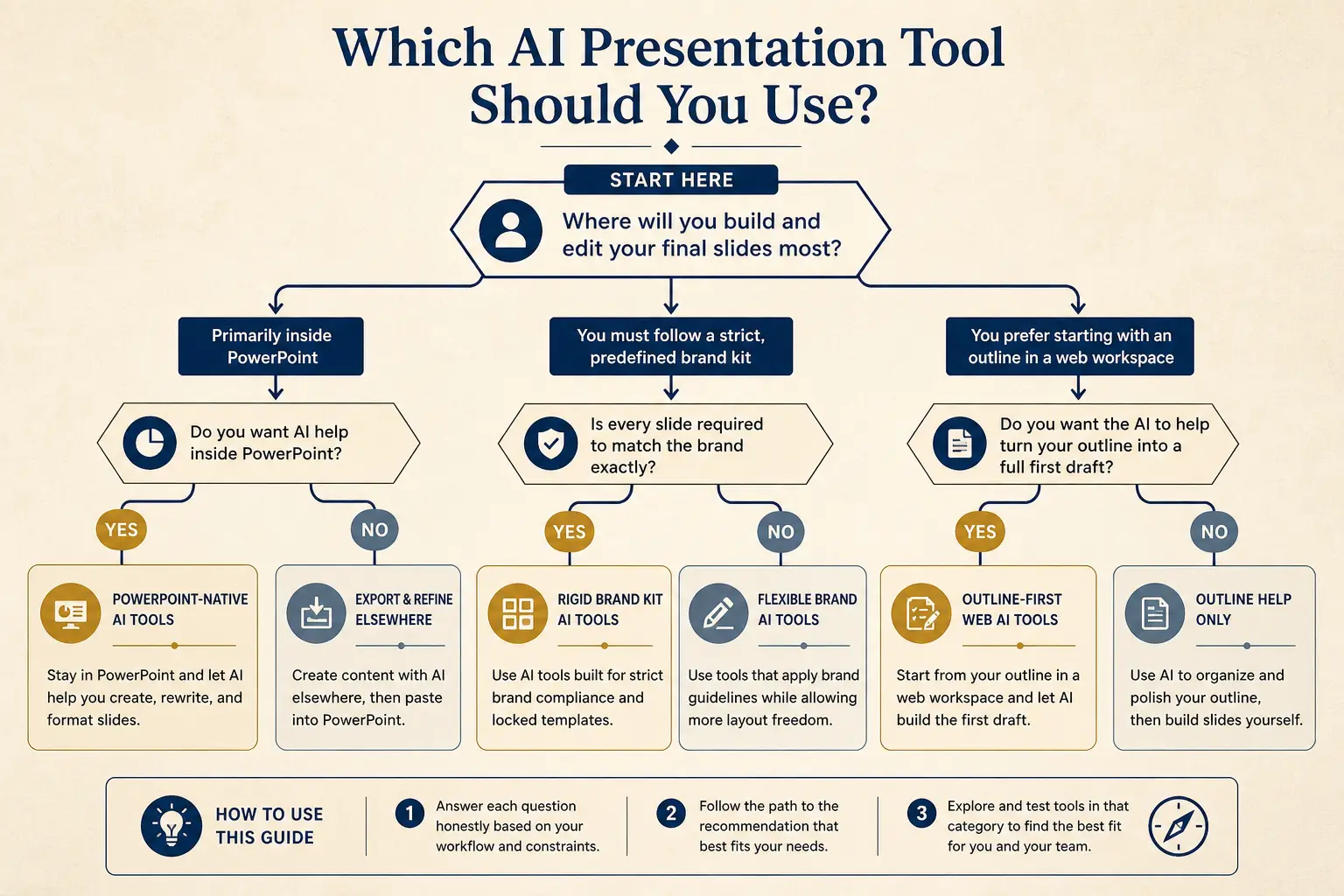
CUTS is the preflight for document to presentation AI: Choose the decision, Underline must-keep claims, Trim omissions, Time-box the room, Shape the channel. Paste after CUTS, not before. Teams that paste first spend an hour deleting slides that should never have existed. Write CUTS as a short brief above the source excerpt you feed Gamma.
- Choose, one primary decision or learning outcome for the meeting.
- Underline, five to twelve claims that must appear as titles or proof.
- Trim, list sections to omit: tangents, secrets, backlog trivia.
- Time-box, minutes and stakes so slide count has a ceiling.
- Shape, present link versus leave-behind file; density follows.
How Gamma converts documents
- Paste CUTS brief plus the relevant excerpt—not always the whole corpus.
- Generate outline; merge heading-per-slide traps into claim titles.
- Generate slides; regenerate weak sections; attach proof objects.
- Present or export based on Shape from CUTS.
Time-to-usable-deck
Blank PPT path
Outline in docs → design fight → rebuild → 3–8 hours
Outline-first AI path
Prompt → edit outline → generate → polish → minutes to first usable draft
Outline preview
- Narrative, open with Turn these discovery notes into an
- Body, 3–5 slides that carry the argument
- Close, summary, risks, and the ask
Preview only, Gamma expands this into editable slides.
Slide budget from the meeting, not the page count
A forty-page PRD often becomes a twelve-slide decision deck plus appendix. Set minutes and stakes so the model does not reward document length.
Slide budget calculator
Get a realistic slide count from meeting length and stakes, then open a matching prompt in Gamma.
18
Total slides
13
Core narrative
5
Appendix
Create a 18-slide deck for executives who skim. Meeting length: 20 minutes. Stakes: medium. Use an outline-first structure with 13 core narrative slides and 5 appendix slides. Every slide needs one claim and proof.
Open this budget in GammaWorked example: discovery notes to client follow-up
Source: six pages of discovery notes from a call with a VP Operations. Notes include three pains about manual reconciliation, a mention that two analysts spend roughly fifteen hours weekly, a preference to avoid rip- and-replace of their ERP, internal jokes, a speculative pricing thought you should not show yet, and a next-step idea for a technical workshop. Meeting to deliver: twenty-minute follow-up with the VP and a finance partner. Deliverable will be forwarded, so treat it as a leave-behind.
CUTS brief: decision is approve a scoped workshop; must-keep are the three pains in their words, fifteen-hour cost, ERP constraint, workshop agenda, and dated ask; omit internal jokes and speculative pricing; time box twenty minutes but densify for forwarding; channel is present link plus PDF export. Outline becomes problem restatement, cost, constraints, proposed workshop, proof from similar ops team, risks, ask. The six-page notes do not become twenty slides. Speculative pricing never appears.
| Source material | Keep or cut | Slide fate |
|---|---|---|
| Fifteen analyst hours weekly on reconciliation | Keep, quantified cost | Problem or ROI claim slide |
| Avoid rip-and-replace of ERP | Keep, hard constraint | Constraints slide near proposal |
| Speculative pricing brainstorm | Cut, not validated for buyer eyes | Never becomes a slide |
| Technical workshop next step | Keep, exact ask | Closing ask with date and agenda |
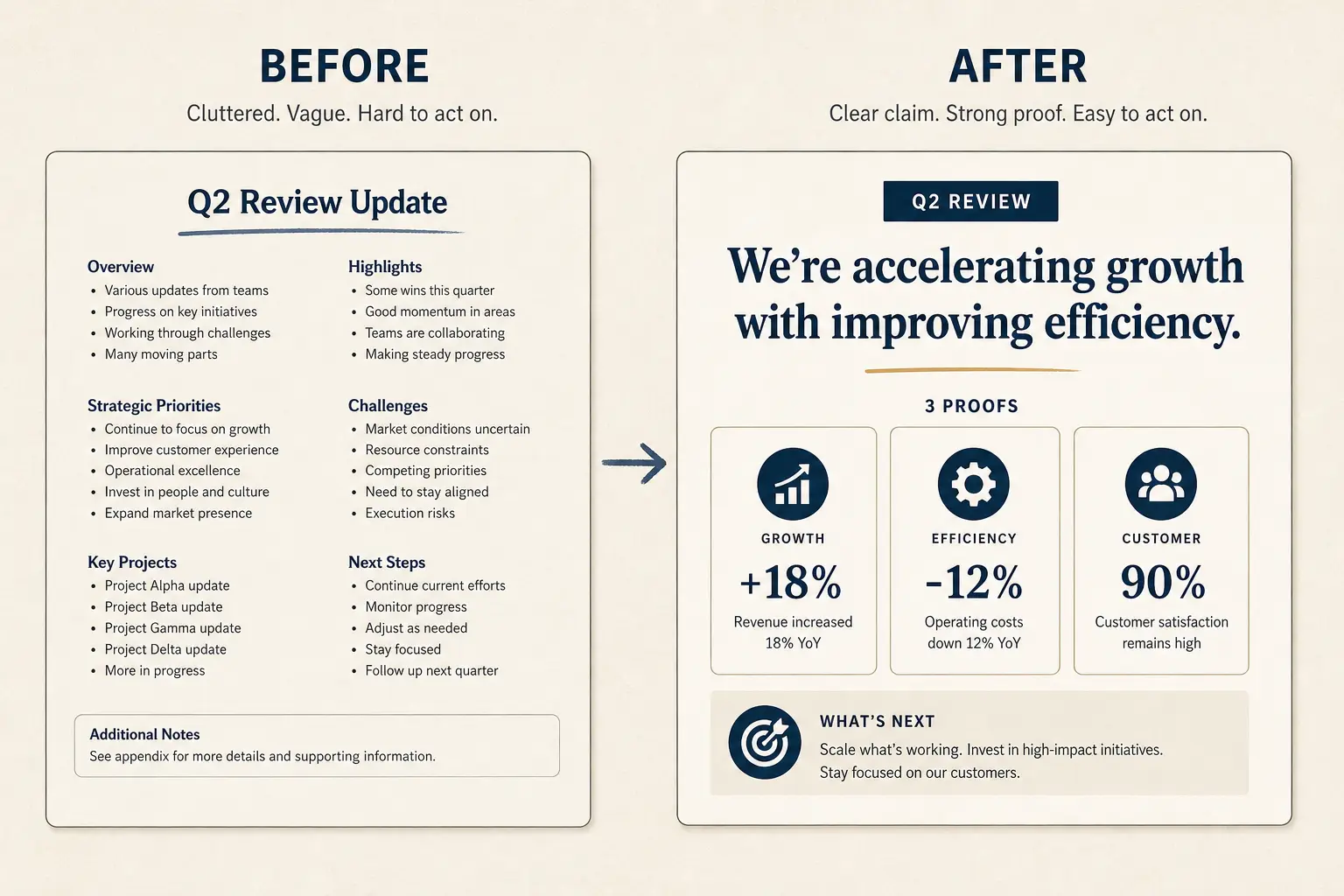
Anatomy of a claim slide
Claim headline (one idea)
Supporting line that states the so-what for this audience.
Source / footnote
Rewrite heading dumps
Paste a bad outline born from document headings. Force claim-proof-ask before you generate the full deck.
Weak bullets → claim/proof/ask
Paste a bad slide. Get a rewrite pattern you can drop into Gamma, not vibes, a structure.
- Claim: Introduction (make the cost of inaction obvious)
- Proof: Background (add a number, name, or constraint)
- Proof: Findings (add a number, name, or constraint)
- Proof: Recommendations (add a number, name, or constraint)
- Ask: Appendix (one decision, one owner, one date)
Source-type playbooks
Meeting notes: prioritize decisions, owners, and quotes; cut banter. PRDs: prioritize user problem, success metrics, options, and risks; cut backlog trivia. Research memos: prioritize question, evidence, and implications; cut literature tours. Strategy briefs: prioritize where to play and resource asks; cut historical essays. Investor memos: decide whether the artifact should become a pitch, an update, or stay prose— then route to the matching money page.
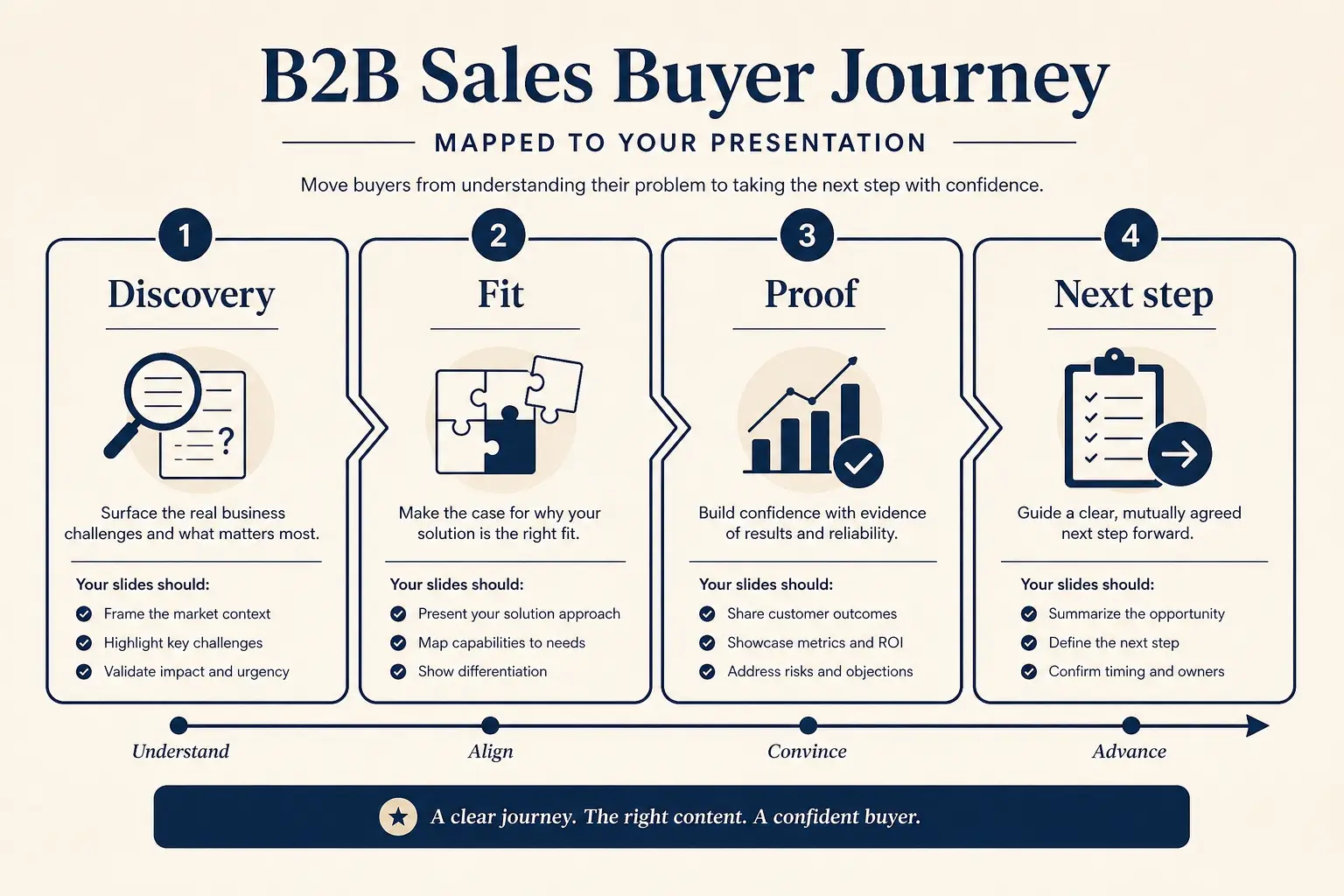
Buyer journey → slide map
Discovery
Pain + stakes
Fit
Why you win
Proof
ROI / risk
Next step
Clear ask
Present and export after conversion
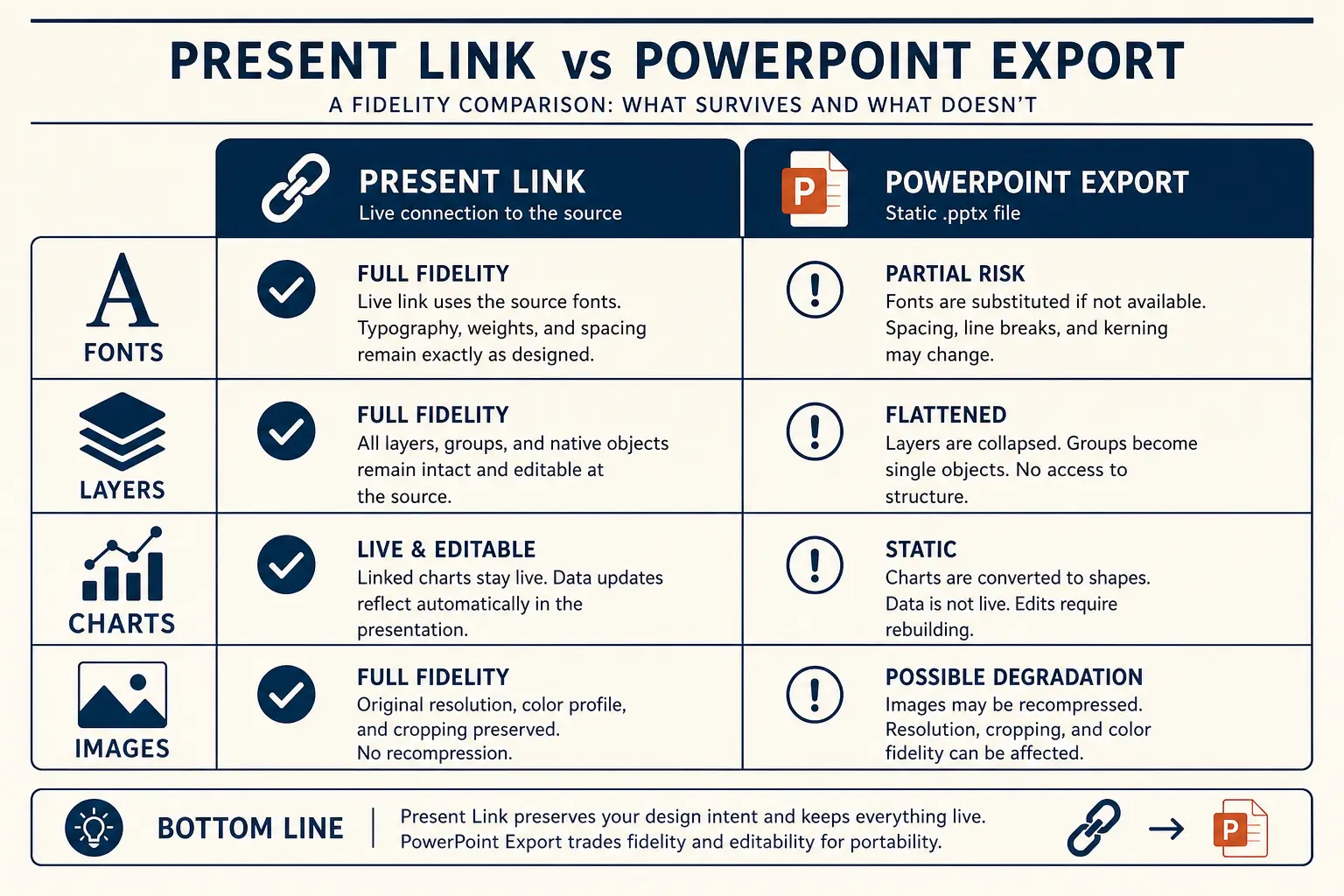
Document-origin decks are often forwarded. If so, write denser and put assumptions on the canvas. If you will present live, leave air for talk track. Export guidance lives on export to PPTX; broader file workflow on the AI PowerPoint generator page. General create ritual on create a presentation with AI. Plans cover export access.
Present link vs PPTX fidelity
Present link
- • Live latest edits
- • Best for your room
- • Analytics-friendly
Export PPTX / PDF
- • Offline / procurement
- • Brand review in PPT
- • Expect cleanup passes
Slide density spectrum
Sparse
Live stage
1 claim, huge type
Balanced
Default
Claim + 3 proofs
Dense
Leave-behind
Detail for async read
Failure modes when converting documents
- Heading-per-slide outlines that read like a table of contents.
- Pasting entire corpora without Trim omissions for secrets and trivia.
- Letting document length dictate slide count instead of minute budget.
- Keeping speculative internal notes that should never meet the audience.
- Summarizing into paragraphs, then still facing a blank slide canvas.
- Forcing a deck when a memo would have decided faster.
- Accepting AI compression that drops the only metric that mattered.
- Skipping the outline gate because the source already felt structured.
Related workflows live under Learn. For sales-shaped outputs, continue on the AI sales presentation page. For exec decisions, use the AI board deck path. For blank-canvas rituals without a source doc, use create a presentation with AI, or start from the templates library when you want a job-shaped outline before pasting the doc.
Source hygiene and collaboration habits
Document to presentation quality is mostly source hygiene. Highlight decisions, owners, and must-keep claims in the source before you paste. If your notes tool supports it, tag omit for confidential or speculative lines. AI will not infer sensitivity. Teams that paste raw chat logs without tags regularly leak internal jokes, unfinished pricing, or HR-adjacent commentary into customer decks.
For collaborative docs, appoint a cutter. One person owns CUTS for the meeting. Others can suggest must-keep claims, but a single cutter prevents every stakeholder from demanding their pet section become a slide. Without a cutter, document length becomes political, and the deck inflates until the minute budget dies.
Use appendix deliberately. Detail that supports diligence can live behind the live path. Detail that only exists because someone wrote it in the PRD should be deleted. The test is simple: if removing the section would not change the decision, it does not belong in the core path. AI compression is not a substitute for that test.
When converting research memos into lectures, rewrite headings into learning objectives and evidence beats. Heading-per-slide creates table-of-contents decks that bore rooms. Put one exercise beat in the outline so teaching is not monologue. Density should stay sparer for live teaching even if the memo was dense.
For client workshops, convert notes within twenty-four hours while language is fresh. Discovery phrases decay quickly into vendor slogans if you wait a week. CUTS still applies: choose the decision, underline claims, trim secrets, time-box, shape the channel. Then generate. Speed without CUTS just industrializes slide novels.
Rehearse with the title-only read after conversion. If titles still sound like document headings, you are not done. Rewrite until a late arriver could follow the argument from titles alone. That habit separates document to presentation AI that helps from tools that merely paginate prose.
Teachers converting research memos should place learning objectives in the first outline section and schedule an exercise beat before the close. Document structure optimized for reading rarely matches classroom pacing. CUTS forces the rewrite. Without it, document to presentation AI produces slide novels students cannot follow in real time.
Consultants should maintain a redaction pass after outline generation. Search for client names that should stay coded, internal margin notes, and unfinished recommendations. The outline gate is the cheapest place to catch leakage. Once layouts exist, people become reluctant to delete polished mistakes.
Frequently asked questions
Convert the doc after CUTS—not before
Open Gamma with your decision, must-keep claims, and omissions. Approve the outline, then generate slides worth presenting.