Learn · Workflows
PDF to presentation with AI, distill claims, don’t paginate
PDF-to-presentation fails when AI paginates a brief into twenty near-duplicate slides. The job is distillation: extract the decision, claims, and proof, then build a talk or leave-behind with honest citation of the source. This guide covers RFPs, research reports, PRDs, and board packets that must become live narratives without losing traceability.
Parent guide: workflows hub. Method notes: how we evaluate decks. Product entry: AI presentation maker.
Distill, don’t paginate
Extraction order: document job (what decision does this PDF support?) → claim list → proof with page references → outline → slides → figure replacement. Pagination skips the claim list and creates cleanup debt.
Long documents want distillation, not page mirrors. Readers in a meeting rarely need full methodology mid-narrative, appendix it.
AI that paginates is automation without judgment. Your judgment is the product.
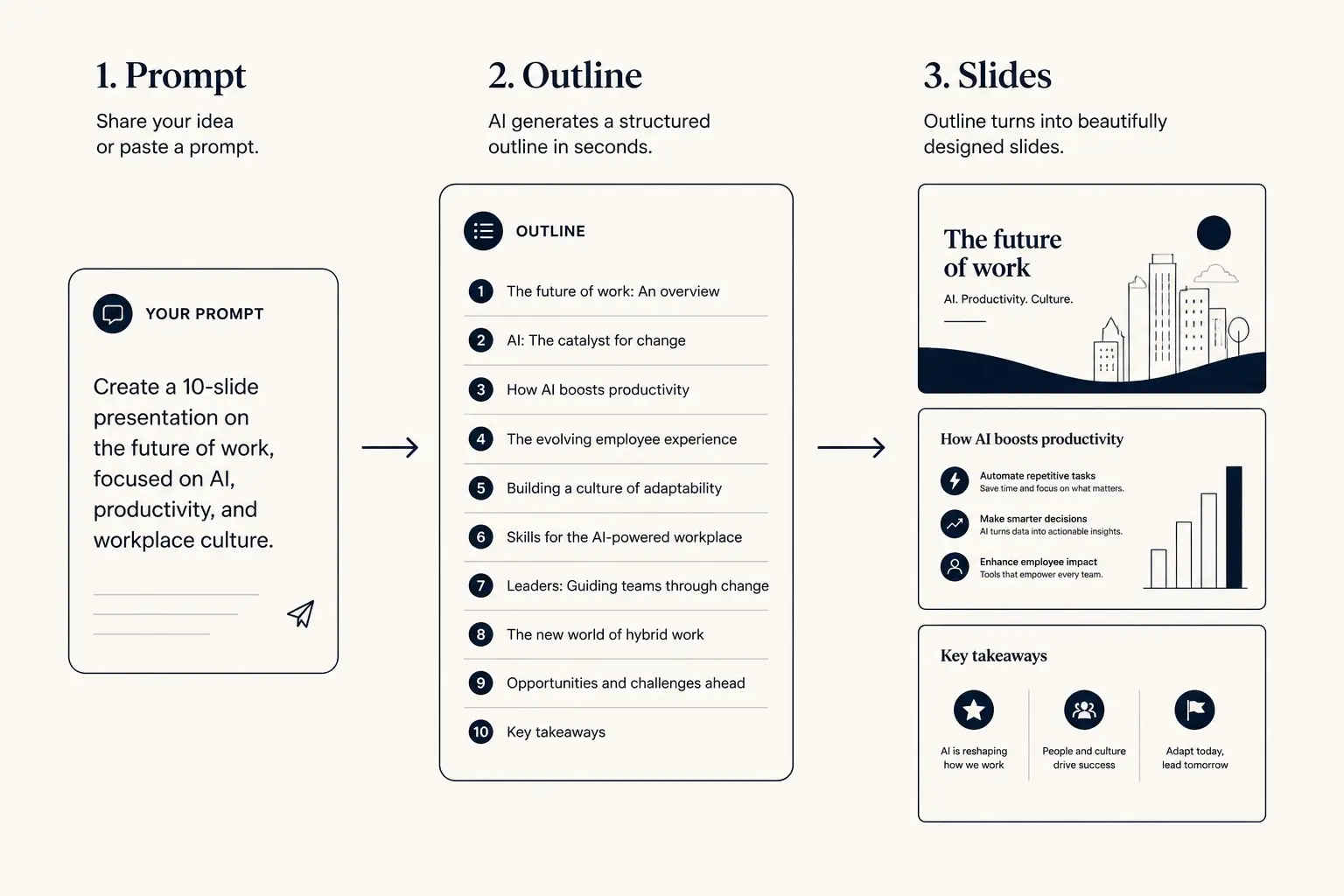
Prompt → outline → slides
1. Prompt
Audience, goal, length, proof you already have.
2. Outline
- • Opening claim
- • Proof beats
- • Ask / next step
3. Slides
Who this is for
Proposal managers, research translators, PMs turning PRDs into exec reviews, analysts briefing leaders from long PDFs. Not for: OCR miracles on scanned handwriting with no review, or pretending a 120-page SOC report becomes five slides of absolute assurance.
Security questionnaires still need appendix exhibits. Legal contracts need briefing covers, not slide-wrapped clause dumps.
If the room must markup clauses, keep the PDF central and make slides the briefing layer.
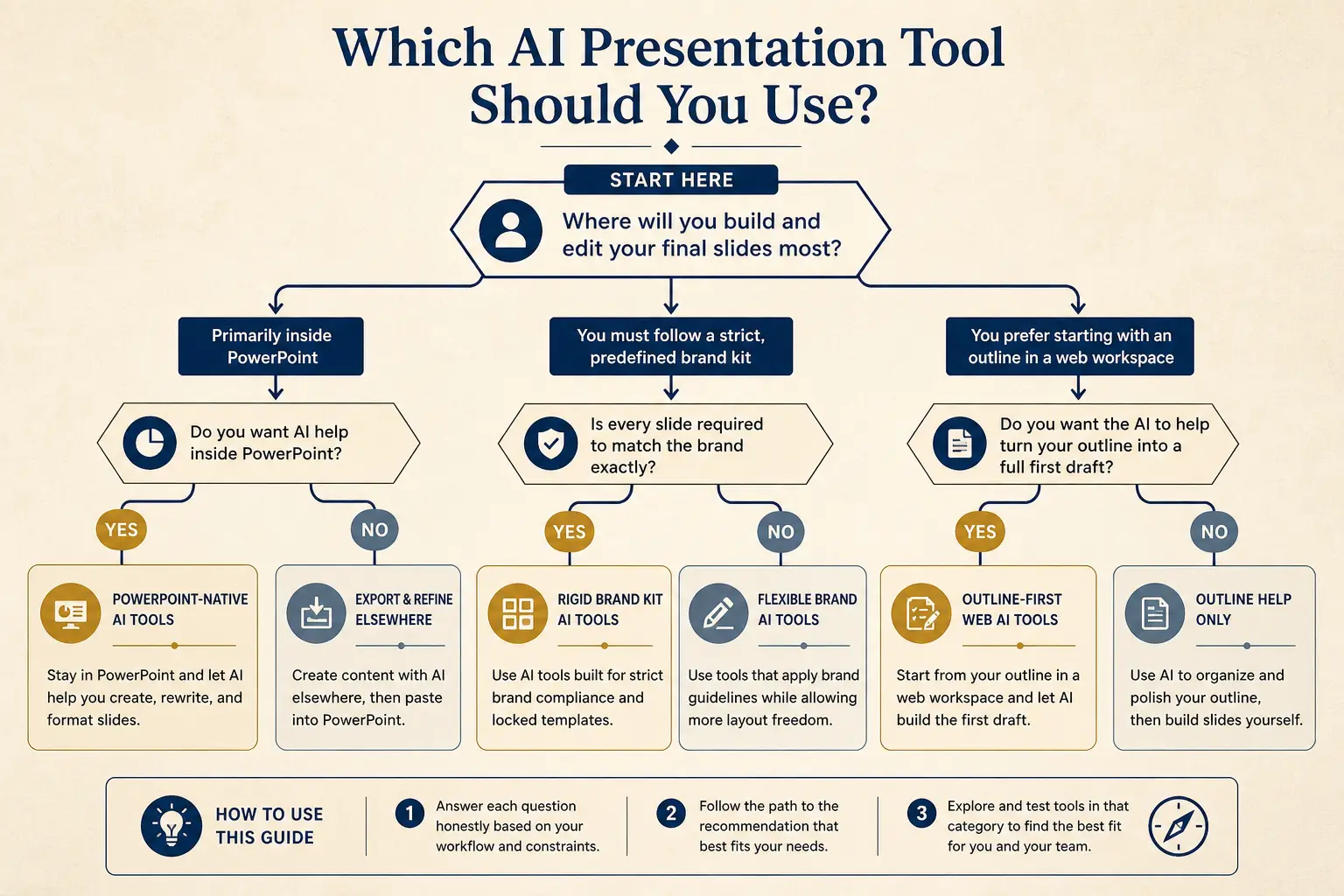
Which tool for which job
Need native PowerPoint editing every day?
Yes → Plus AI / Copilot · No → continue
Need rigid brand kits across a large team?
Yes → Beautiful.ai / enterprise kits · No → continue
Need outline-first AI drafting + present link?
Yes → Gamma
Worked example: RFP excerpt to pursuit desk
Situation: a mid-market cybersecurity vendor has a 64-page RFP. The pursuit team needs a twelve-slide internal go/no-go and response plan by tomorrow. Evaluation weights: security 30, integration 25, price 20, experience 15, support 10.
Wrong: one slide per RFP section summarizing text. Right: extract must-win requirements with section IDs; map to capability truth list; outline risks (integration unknown); recommendation; workstream owners; timeline to first draft response. Figures: architecture diagram re-exported from source Visio, not a fuzzy PDF crop.
Go/no-go became a real decision because unknowns were visible. Pagination would have hidden them in volume.
Anatomy of a claim slide
Claim headline (one idea)
Supporting line that states the so-what for this audience.
Source / footnote
Outline preview
- Narrative, open with From this RFP excerpt: [paste key
- Body, 3–5 slides that carry the argument
- Close, summary, risks, and the ask
Preview only, Gamma expands this into editable slides.
Figure and table fidelity
Assume every auto-extracted figure is guilty until re-exported. Blurry crops and truncated axes are how briefings lose trust. Replace charts from source data; keep PDF page references for legal tables you cannot alter.
Label placeholders clearly in the outline (FIGURE PENDING). Do not let AI redraw a chart with invented values.
A missing figure is better than a wrong figure. Wrong figures become decisions.
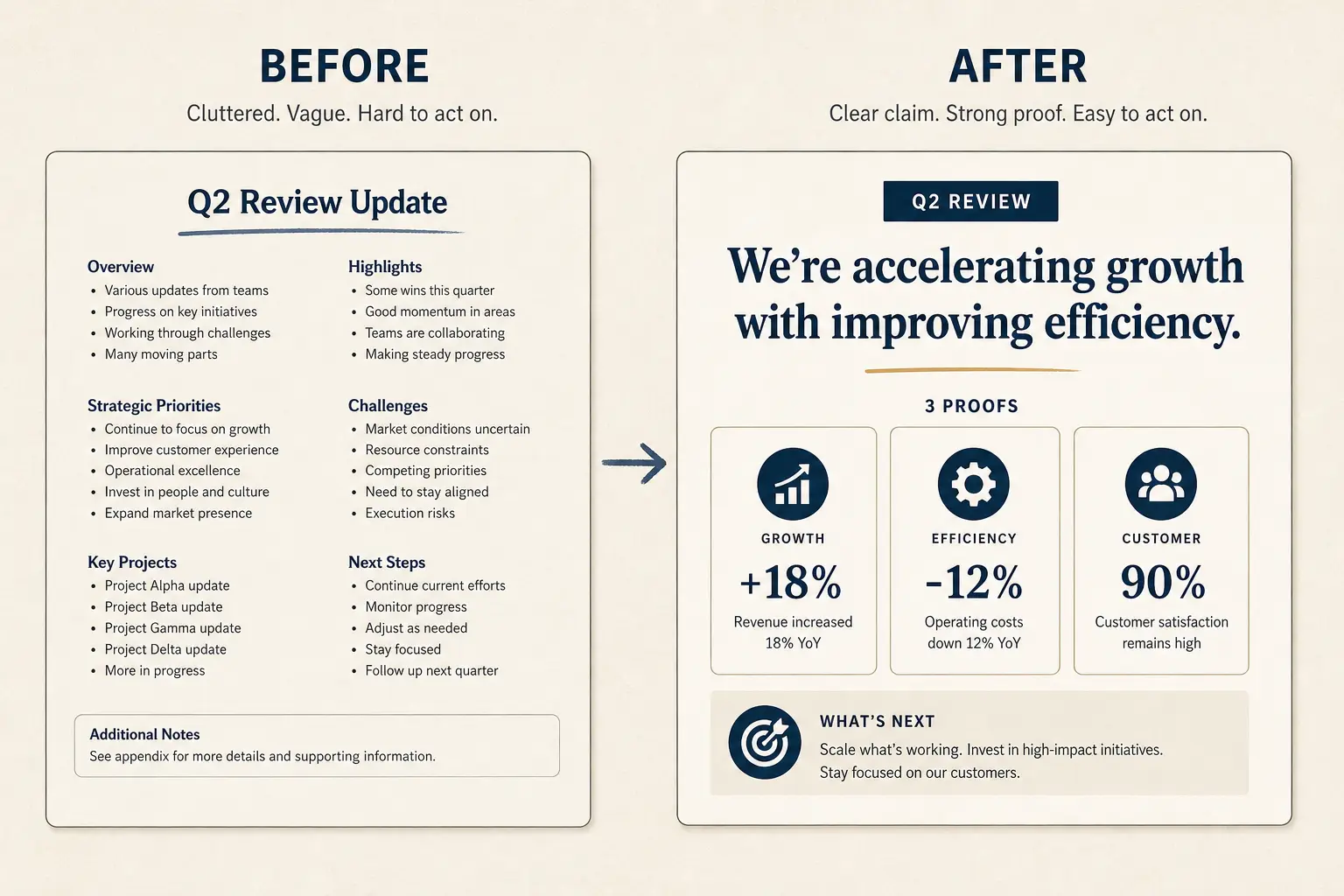
Weak slide → strong slide
Before
- • Overview
- • Features
- • Next steps???
After
- • Cost of status quo
- • Wedge in one claim
- • Proof + decision ask
Claim extraction prompts that work
Ask the model for a table: claim | type (decision/fact/opinion) | page/section | confidence | include-in-live (y/n). Then build slides only from include-in-live rows humans approved.
Ban “summarize the entire PDF.” Prefer pasting the decision section and executive summary first.
Prompt discipline is the difference between distillation and pagination.
Slide density spectrum
Sparse
Live stage
1 claim, huge type
Balanced
Default
Claim + 3 proofs
Dense
Leave-behind
Detail for async read
Weak bullets → claim/proof/ask
Paste a bad slide. Get a rewrite pattern you can drop into Gamma, not vibes, a structure.
- Claim: Page 1 summary (make the cost of inaction obvious)
- Proof: Page 2 summary (add a number, name, or constraint)
- Proof: Page 3 summary (add a number, name, or constraint)
- Proof: Page 4 summary (add a number, name, or constraint)
- Ask: Conclusion (one decision, one owner, one date)
Failure modes
Failure: slide-per-page. Failure: invented citations. Failure: dropping caveats that lived in footnotes. Failure: executive decks that bury the recommendation on slide sixteen. Failure: exporting before figures are replaced.
Put recommendation early for exec audiences. Keep caveats adjacent to the claims they modify.
Distillation without caveat preservation is just spin. Spin fails in Q&A.
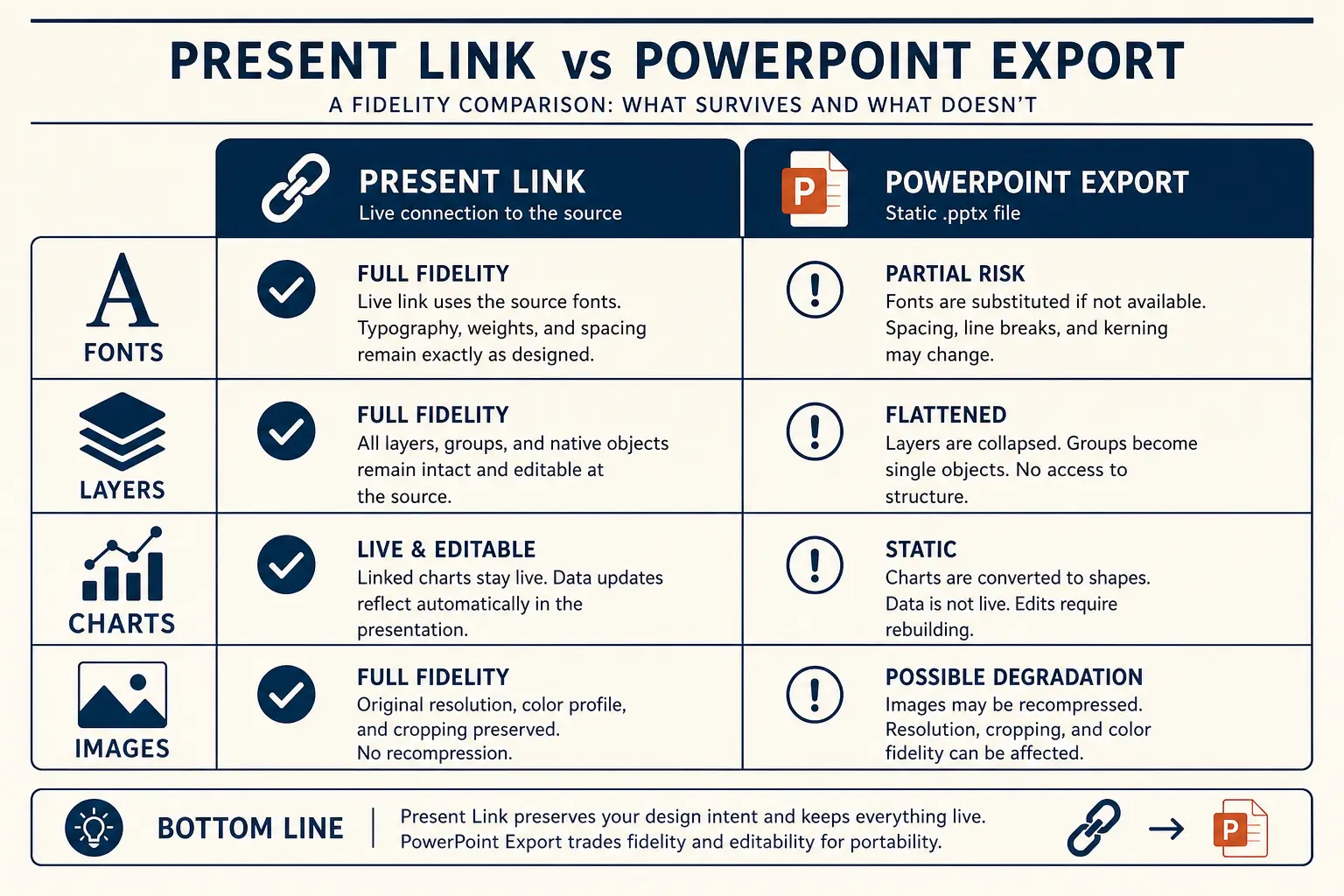
Present link vs PPTX fidelity
Present link
- • Live latest edits
- • Best for your room
- • Analytics-friendly
Export PPTX / PDF
- • Offline / procurement
- • Brand review in PPT
- • Expect cleanup passes
Slide budget calculator
Get a realistic slide count from meeting length and stakes, then open a matching prompt in Gamma.
18
Total slides
13
Core narrative
5
Appendix
Create a 18-slide deck for executives who skim. Meeting length: 25 minutes. Stakes: medium. Use an outline-first structure with 13 core narrative slides and 5 appendix slides. Every slide needs one claim and proof.
Open this budget in GammaPRDs, research, and board packets
PRDs: lead with decision and options, appendix the full requirements. Research: lead with question and finding, appendix methods detail. Board packets: lead with decision ask and metrics definitions, appendix reconciliations.
Each genre has a different honesty failure mode, inventing traction is not the same as dropping a methods caveat, but both are fatal.
Name the genre in your prompt so Gamma weights the spine correctly.
Notion and other docs
Notion pages behave like living PDFs: headings drift, toggles hide decisions. Freeze a clean export or paste the decision blocks. Same claim-table method. See the Notion blog for workspace hygiene.
Toggle-hidden text is a classic miss, expand before extraction. Comments are not decisions unless confirmed.
Living docs need a freeze point before deck builds, or you will chase edits forever.
Delivery artifacts after conversion
Internal iteration: present link. Executive forward culture: PDF. Brand markup: PPTX with export cleanup pass. Do not discover the artifact requirement after you designed twenty builds.
See export PPTX spoke for hierarchy cleanup. See present-link vs PPTX for the decision matrix.
Conversion is not done at generate, it is done when the required artifact survives the room.
Gamma handoff
Extract claims with page IDs. Approve include-in-live rows. Prompt Gamma with capability truth constraints. Generate. Replace figures. Deliver the artifact the room requires.
Pair with document-to-presentation for product pathing. Return to the workflows hub for adjacent pipelines.
PDFs become presentations when claims become skimmable, not when pages become slides.
Operating rules for pdf-to-presentation
Treat PDF to presentation with AI, distill claims, don’t paginate as a constrained operating problem, not a theme exercise. The constraint set on this page, audience, proof rules, artifact choice, and cut list, is what makes the guidance non-generic relative to workflows hub.
Write the decision or learning outcome in one sentence before you touch Gamma. Paste only proof you can defend in Q&A; blanks beat fiction. Name the artifact (present link, PDF, or PPTX) in the outline header so design stays honest. Schedule one title-only skim with a second person when stakes are external. If a section cannot map to the framework on this page, cut it rather than decorating it.
The scenario details earlier on this URL earn the long-tail ranking; these rules keep execution from drifting back to generic AI output under deadline pressure.
Edit loops that save time on pdf-to-presentation
Most time waste happens after generation: endless theme tweaks while titles still fail a ninety-second skim. Invert the loop for PDF to presentation with AI, distill claims, don’t paginate: skim titles, fix claims, fill proof blanks, then adjust visual density for the chosen artifact.
Loop A (10 minutes): title-only skim and cuts. Loop B (15 minutes): proof fill and definition footnotes. Loop C (10–40 minutes): artifact readiness, including PPTX cleanup if required. Loop D (one pass): timed rehearsal or peer read for async leave-behinds. Stop when the decision or learning outcome is unmistakable to a skeptical reader.
If Loop C dominates every week, you are designing for the wrong artifact or carrying too much decorative hierarchy. Simplify the master instead of heroically cleaning exports forever.
Vocabulary lock for pdf-to-presentation
Generic AI slides drift into vendor vocabulary. Lock the words your audience already uses, course rubric language, buyer phrases from discovery, investor metric definitions, or committee method terms, and paste that glossary into the prompt as a constraint.
Build a ten-term glossary for this scenario before generating. Ban three fluffy phrases that always appear in weak drafts for this job. Require metric definitions on-slide when a skeptic could misread a chart. Prefer audience-native verbs over interchangeable corporate verbs. Keep the glossary next to the prompt template so updates are mechanical.
Vocabulary locks are how long-tail pages stay specific. Without them, every deck collapses into the same interchangeable AI tone.
Ship bar for pdf-to-presentation
Ship only when a skeptical reviewer can answer: what is the ask or learning outcome, what proof supports it, what did we cut, and which artifact is canonical. If any answer is fuzzy, you are not done, regardless of how polished the theme looks.
Ask or outcome is on a slide, not only in speaker notes. Proof inventory matches on-slide claims one-to-one. Failure-mode cuts from this page have been applied once. Permissions or file open tests completed for the delivery path. Owners and dates exist for follow-ups when the job is operational.
This bar is stricter than “looks fine.” Clear answers under skepticism are how PDF to presentation with AI, distill claims, don’t paginate work actually lands.
Gamma habit for pdf-to-presentation
In Gamma, keep the durable habit outline-first: paste a scenario-specific prompt from this page, lock titles, generate, regenerate weak sections with diff prompts, then present or export on purpose. Do not restart from a blank vibe prompt when a long-tail spec already exists for PDF to presentation with AI, distill claims, don’t paginate.
Keep a team library of A-tier prompts keyed to jobs like this URL. Store proof inventories next to decks so updates are mechanical. Prefer section regen over full rerolls when one metric changes. Link workflows hub from your internal wiki so people escalate to systems when they outgrow this scenario. Re-read Method when tool debates appear, architecture arguments need shared axes.
Day-to-day excellence is boring repetition of good constraints. This page supplies the constraints for one job; Gamma supplies the editable structure to execute them quickly.
Field notes 1 for pdf-to-presentation
When teams apply PDF to presentation with AI, distill claims, don’t paginate in the wild, the same friction shows up: rushed prompts, missing proof inventories, late artifact switches, and reviews that argue about taste instead of decisions. Field note 1 is a corrective habit, small enough to run weekly, strict enough to prevent cleanup debt.
Habit: freeze a proof inventory before any generate click, even when the calendar is cruel. Habit: run a ninety-second title skim with someone who was not in the working session. Habit: write the artifact choice in the outline header and refuse layout work that contradicts it. Habit: cut twenty percent after first rehearsal or first async read, on purpose. Habit: log one failure mode from this page that you actually hit, and patch the team template. Habit: prefer section regen with updated proof over full rerolls that reshuffle a working spine.
These habits are not motivational posters. They are the difference between AI that compresses work and AI that creates a second shift of cleanup. Attach them to workflows hub rituals so they survive personnel changes.
Field notes 2 for pdf-to-presentation
When teams apply PDF to presentation with AI, distill claims, don’t paginate in the wild, the same friction shows up: rushed prompts, missing proof inventories, late artifact switches, and reviews that argue about taste instead of decisions. Field note 2 is a corrective habit, small enough to run weekly, strict enough to prevent cleanup debt.
Habit: freeze a proof inventory before any generate click, even when the calendar is cruel. Habit: run a ninety-second title skim with someone who was not in the working session. Habit: write the artifact choice in the outline header and refuse layout work that contradicts it. Habit: cut twenty percent after first rehearsal or first async read, on purpose. Habit: log one failure mode from this page that you actually hit, and patch the team template. Habit: prefer section regen with updated proof over full rerolls that reshuffle a working spine.
These habits are not motivational posters. They are the difference between AI that compresses work and AI that creates a second shift of cleanup. Attach them to workflows hub rituals so they survive personnel changes.
Field notes 3 for pdf-to-presentation
When teams apply PDF to presentation with AI, distill claims, don’t paginate in the wild, the same friction shows up: rushed prompts, missing proof inventories, late artifact switches, and reviews that argue about taste instead of decisions. Field note 3 is a corrective habit, small enough to run weekly, strict enough to prevent cleanup debt.
Habit: freeze a proof inventory before any generate click, even when the calendar is cruel. Habit: run a ninety-second title skim with someone who was not in the working session. Habit: write the artifact choice in the outline header and refuse layout work that contradicts it. Habit: cut twenty percent after first rehearsal or first async read, on purpose. Habit: log one failure mode from this page that you actually hit, and patch the team template. Habit: prefer section regen with updated proof over full rerolls that reshuffle a working spine.
These habits are not motivational posters. They are the difference between AI that compresses work and AI that creates a second shift of cleanup. Attach them to workflows hub rituals so they survive personnel changes.
Field notes 4 for pdf-to-presentation
When teams apply PDF to presentation with AI, distill claims, don’t paginate in the wild, the same friction shows up: rushed prompts, missing proof inventories, late artifact switches, and reviews that argue about taste instead of decisions. Field note 4 is a corrective habit, small enough to run weekly, strict enough to prevent cleanup debt.
Habit: freeze a proof inventory before any generate click, even when the calendar is cruel. Habit: run a ninety-second title skim with someone who was not in the working session. Habit: write the artifact choice in the outline header and refuse layout work that contradicts it. Habit: cut twenty percent after first rehearsal or first async read, on purpose. Habit: log one failure mode from this page that you actually hit, and patch the team template. Habit: prefer section regen with updated proof over full rerolls that reshuffle a working spine.
These habits are not motivational posters. They are the difference between AI that compresses work and AI that creates a second shift of cleanup. Attach them to workflows hub rituals so they survive personnel changes.
Field notes 5 for pdf-to-presentation
When teams apply PDF to presentation with AI, distill claims, don’t paginate in the wild, the same friction shows up: rushed prompts, missing proof inventories, late artifact switches, and reviews that argue about taste instead of decisions. Field note 5 is a corrective habit, small enough to run weekly, strict enough to prevent cleanup debt.
Habit: freeze a proof inventory before any generate click, even when the calendar is cruel. Habit: run a ninety-second title skim with someone who was not in the working session. Habit: write the artifact choice in the outline header and refuse layout work that contradicts it. Habit: cut twenty percent after first rehearsal or first async read, on purpose. Habit: log one failure mode from this page that you actually hit, and patch the team template. Habit: prefer section regen with updated proof over full rerolls that reshuffle a working spine.
These habits are not motivational posters. They are the difference between AI that compresses work and AI that creates a second shift of cleanup. Attach them to workflows hub rituals so they survive personnel changes.
Frequently asked questions
Distill a PDF into a decision deck
Extract claims and proof first in Gamma, then generate slides. Never paginate a brief.